
language

English

Steal the Look! Click to Replicate it with Your Product!

Text to Video AI – Create Videos from Text Prompts Online

Text to Video AI is an online generative AI video tool that helps users transform text prompts, scripts, product descriptions, articles, campaign copy, ai generated images, and creative ideas into polished videos in minutes. With advanced video models, script-to-video creation, image to video AI support, cinematic visuals, AI avatars, voiceovers, subtitles, captions, B-roll, editing tools, and social-ready formats, users can create AI videos for TikTok, Instagram, YouTube, product videos, ads, explainer videos, UGC content, training materials, news summaries, film trailers, and commercial projects.

Real-World Use Cases for Text to Video AI

Creating Social Media Videos from Simple Prompts

A content creator named Lina Brooks needed daily video clips for TikTok, Instagram, and YouTube Shorts, but filming new content every day took too much time. She used Text to Video AI to generate high quality videos from short prompts, ai generated images, and sample video ideas. By describing the video type, tone, camera angles, visual style, and target audience, she could produce cinematic sequences with captions, voiceover, natural motion, and consistent pacing. The editing tools also helped Lina narrate videos, refine social posts, and publish more stunning videos without starting every project from scratch.
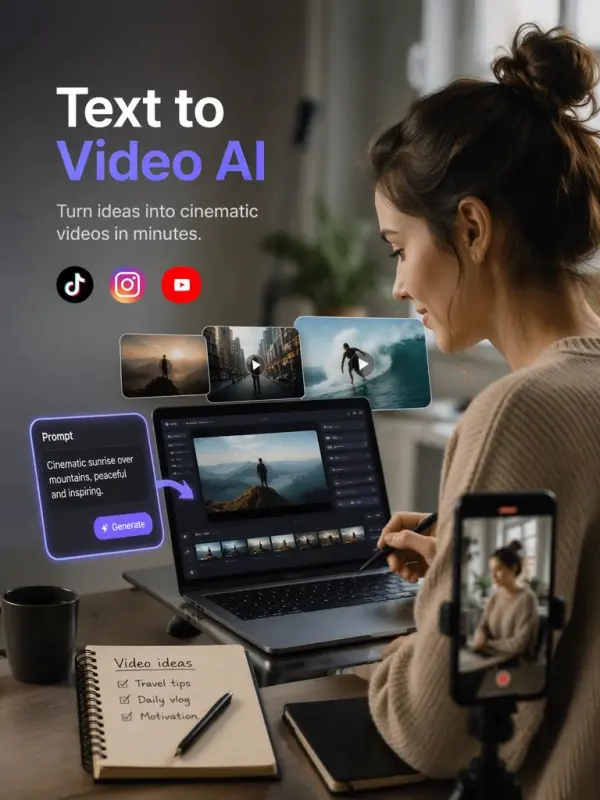
Creating text to video Social Media Video

Turning Product Descriptions into Demo Videos

A small ecommerce brand called Northline Goods wanted product videos for landing pages, paid ads, and commercial projects. The team entered product descriptions, key benefits, campaign copy, and reference ai generated images into a text-to-video AI workflow. The AI used image models and video models to generate product scenes with high quality visuals, realistic textures, feature highlights, natural motion, captions, and voiceover. This gave the team more creative control over cinematic visuals, visual consistency, and other elements, making it easier to create stunning ai generated videos without booking a studio or hiring a full production team.
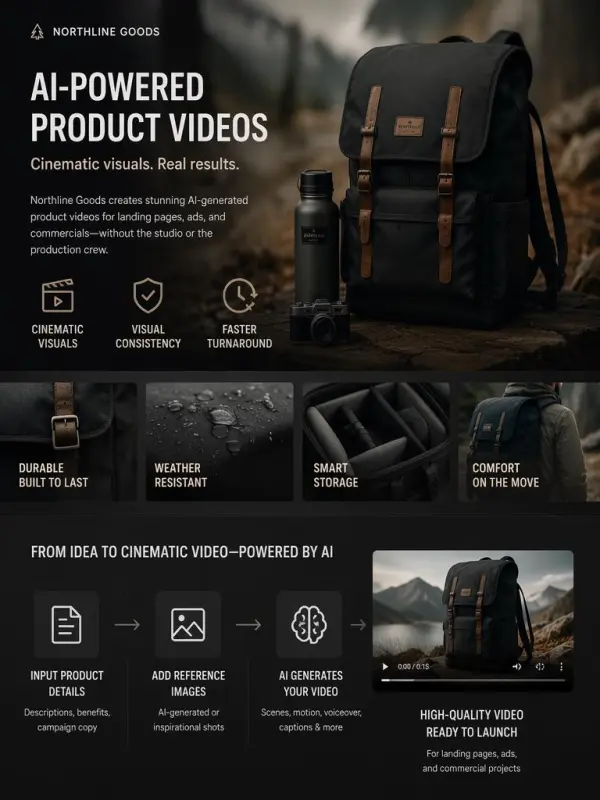
Product video by weshop
Previous
Next

Key Features of Text to Video AI

Create Videos from Text Prompts

Text to Video AI helps users create a video by turning simple prompts into structured visual drafts. Simply describe the topic, audience, mood, first frame, camera style, and video type, then click generate. For reliable results, the AI reads intent, maps words into semantic meaning, and brings ideas to life with less production time.

Turn Scripts and Articles into Videos

The tool can convert scripts, articles, product descriptions, manuals, and campaign copy into short clips or one video with scenes, captions, narration, and sound effects. Users asking “how does text become video” often want automation that understands context. Some tools also support multiple languages, making content easier to localize for commercial purposes.

Cinematic Effects and B-Roll Generation

Text to Video AI can generate cinematic sequences, B-roll, product shots, transitions, and visual effects from a written description. The AI often starts from visual noise and gradually refines it into cleaner scenes. Users can fine tune lighting, motion, camera direction, sound effects, and aspect ratio for more reliable results.

Social Media and Ad-Ready Formats

The generator can produce videos for TikTok, Instagram, YouTube, ads, websites, product pages, and presentations. Users can choose vertical, square, or widescreen aspect ratio settings depending on the platform. Some tools generate short clips up to a few seconds, making them useful for fast hooks, promos, and commercial purposes.

Beginner-Friendly Online Workflow

Text to Video AI works online without cameras, actors, editing timelines, or production teams. The workflow is simple: enter text, choose a style, adjust settings, click generate, preview the result, and download. Users can fine tune prompts, upload still images, add sound effects, and reduce production time while keeping creative control.

What You Can Do with Text to Video AI

Create Social Media Videos

Use Text to Video AI to create short clips or full-length social videos for TikTok, Instagram, YouTube, LinkedIn, and more. Simply describe the hook, first frame, mood, audience, and message, then click generate. The tool helps creators bring ideas to life faster while producing reliable results for daily content.

Generate Video Ads from Campaign Copy

Marketing teams can create a video from campaign copy, product benefits, sales messages, or promotional scripts. AI can add scenes, captions, narration, sound effects, and product-focused visuals for Meta ads, Google ads, landing pages, and social campaigns. This reduces production time and helps teams fine tune ads for commercial purposes.

Build Product Demo Videos

Businesses can convert product descriptions into demo videos that explain features, benefits, and use cases. Add still images, product shots, a first frame, and simple prompts to guide motion and structure. Some AI tools can animate 2D or 3D visuals from a single image, making product storytelling easier.

Create UGC and Testimonial Videos

Brands can use Text to Video AI to generate UGC-style clips, customer review videos, talking avatar testimonials, and promotional scripts. Add multiple languages, captions, voiceover, sound effects, and aspect ratio settings for different platforms. This helps teams test hooks, compare personas, and produce one video or several variations quickly.

Prototype Film Ideas and Storyboards

Filmmakers and creative teams can use Text to Video AI to visualize scripts, scene ideas, or storyboards before production. Simply describe the mood, first frame, camera movement, and pacing, then click generate. The tool can create short clips with cinematic direction, helping reduce production time and refine concepts faster.

Frequently Asked Questions About Text to Video AI

What is Text to Video AI?

Text to Video AI is a tool that uses artificial intelligence to turn written prompts, scripts, articles, product descriptions, or ideas into video content with visuals, motion, captions, voiceovers, and scene structure.

Can I create videos from a simple text prompt?

Yes. You can enter a short prompt describing your video idea, audience, style, and message. The AI can generate a video draft with scenes, motion, visuals, and text elements based on your input.

What types of text can I use?

You can use almost any type of text, including scripts, product descriptions, blog posts, manuals, campaign copy, news summaries, bullet points, story ideas, or a short creative prompt.

Can I use Text to Video AI for social media?

Yes. Text to Video AI is useful for creating TikTok videos, Instagram Reels, YouTube Shorts, LinkedIn clips, Facebook videos, and other short-form or long-form social content.

Can I generate video ads with AI?

Yes. Marketers can use AI text-to-video tools to turn ad copy, product benefits, brand messages, and campaign concepts into promotional videos, UGC-style ads, product demos, and launch clips.

Does Text to Video AI support voiceovers?

Many text-to-video workflows support AI voiceovers, text to speech, captions, subtitles, and sometimes AI avatars. These features help create more complete videos from a written script.

Do I need editing skills?

No. Most text-to-video AI tools are designed for users without editing experience. You enter your text, choose settings, generate the video, and refine the result if needed.

Can I create training videos?

Yes. Text to Video AI is useful for training videos, onboarding guides, support tutorials, internal communications, educational clips, and video summaries from manuals or learning materials.

Can I use AI-generated videos commercially?

Commercial use depends on the platform’s license, input rights, music rights, AI avatar terms, and export policy. For safe use, review the tool’s commercial terms before publishing or selling generated videos.

How do I get better results?

Use a clear prompt or script with the topic, target audience, tone, scene details, camera style, visual mood, key message, and desired format. The more specific the text, the more personalized and useful the generated video will be.

Explore More AI Tools

Our new Virtual Try-On just launched. Try it now!
close

HappyHorse AI Video Generator

Create Cinematic Text-to-Video and Image-to-Video Content

GPT Image 2 AI Image Generator

Create High Quality Images, Text Rich Visuals, and Product Photography

Nano Banana

Google's Next-Gen AI Image Model for Instant Professional Creativity

AI Video Generator

Turn Images into Stunning AI Videos for Free

Virtual Try-On

Try On Clothes Online with AI Virtual Try Technology

Swap Model & BG

Realistic Model & Background Swapping Online with AI

AI Fashion Model

Showcase clothing with a variety of models

AI Product

Create stunning product images with few clicks from anywhere

Face Forge

AI Face Morph & Face Swap Generator Online

Product Recoloring

Recolor Image Online Free - Color Changer in WeShop AI

To Mannequin

Convert real model photos into mannequin displays

Change Pose

Change poses, switch between various model poses, making the clothing display more natural

Remove Background

Removing background with lightning speed and ease

AI Photo Enhancer

Enhance Photo Quality Online with Free AI

Relight

Relight your images automatically and efficiently

Expand Image

Expand images & backgrounds to fit any platform

Magic Eraser

Remove unwanted objects from your photos with AI

Hand/Feet Fixer

Regenerate natural-looking hands and feet in AI-generated images

Design Repair

Upload an image, highlight the area you wish to fix, and upload a target reference image

Outfit Generator

Create AI clothes styling from any model photo, garment, or style prompt.

Video Agent

Create and publish videos from a photo or description—instantly, in any style.

AI Clothing Piece Generator

Create Professional Flatlay Clothing Images From Any Photo or Idea

Watermark Video Remover Free Online

Remove Watermark from Video

AI Video Enhancer

Enhance Video Quality Online with AI

Replace Face in Video Online Free

AI Video Face Swap for Realistic Clips

Seedream 5.0

Try the Latest Smart Image Creation Model Online

Seedance 2.0

A Multi-Modal AI Video Creative Engine for Cinematic Storytelling

Sora 2

Next Generation AI Video Generator with Realistic Physics & Storytelling

Wan AI Video Generator

Advanced AI Image & Video Generation Model

Midjourney Image Generator

Use Midjourney v7 to Create AI-Generated Images

Kling 3.0

AI Director Video Model with 4K Cinematic Storytelling

Qwen Image Edit

A Revolutionary Tool for Seamless Image Editing

Z-Image AI Image Generator

Create High-Quality Images from Text Instantly

FireRed Image Edit

Open Source AI Image Editing Model for High Fidelity Edits

Grok Imagine AI Image Generator

Create High-Resolution Images from Text with Aurora AI

Grok Imagine AI Video Generator

Create Cinematic AI Videos with Native Audio & Scene Control

Hailuo AI Video Generator

Create Cinematic AI Videos from Text or Images

Veo 3 AI Video Generator

Create Cinematic Videos from Text or Images

Vidu Q3 AI Video Generator

Create Cinematic Short Videos with Turbo and Pro Modes

Kling Motion Control

Create Realistic Motion Videos from Reference Images and Videos

Imagen 4

Create Photorealistic Images and Accurate Text Visuals with AI

HiDream AI Image Generator

Create Stunning AI-Generated Images Online

Sulphur2

Create Cinematic AI Videos from Text and Images

idea
helper





















