СОЗДАНИЕ ИЗОБРАЖЕНИЙ GPT IMAGE 2

GPT Image 2 — генератор и редактор изображений

GPT Image 2 — модель OpenAI для генерации и редактирования изображений. Принимает текст и изображения для новых работ и изменений по референсам.

gpt-image-2
ПРИМЕРЫ GPT IMAGE 2

Примеры изображений GPT Image 2

Изучайте GPT Image 2 на примерах: Стилизация под неоновую скульптуру; Редакционный разбор по референсу; Джазовый плакат с акцентом на типографике. Каждый сохранённый пример содержит реальный промпт и доступные входные данные. Проверьте результат перед адаптацией под свой объект.

Результат WeShop: Стилизация под неоновую скульптуру
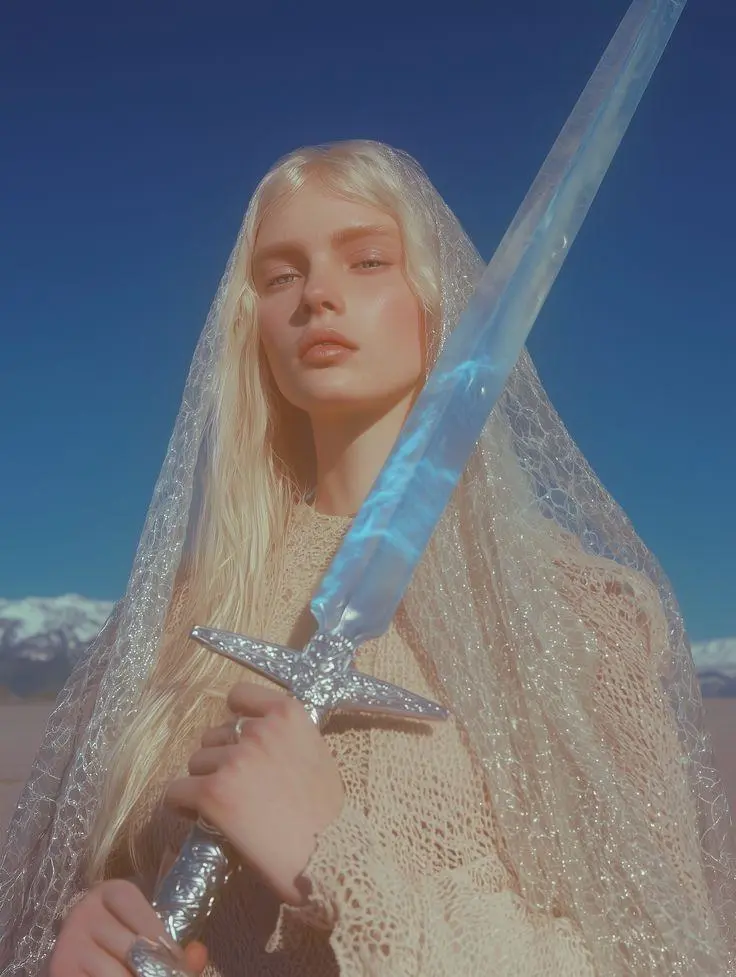
Референс 1

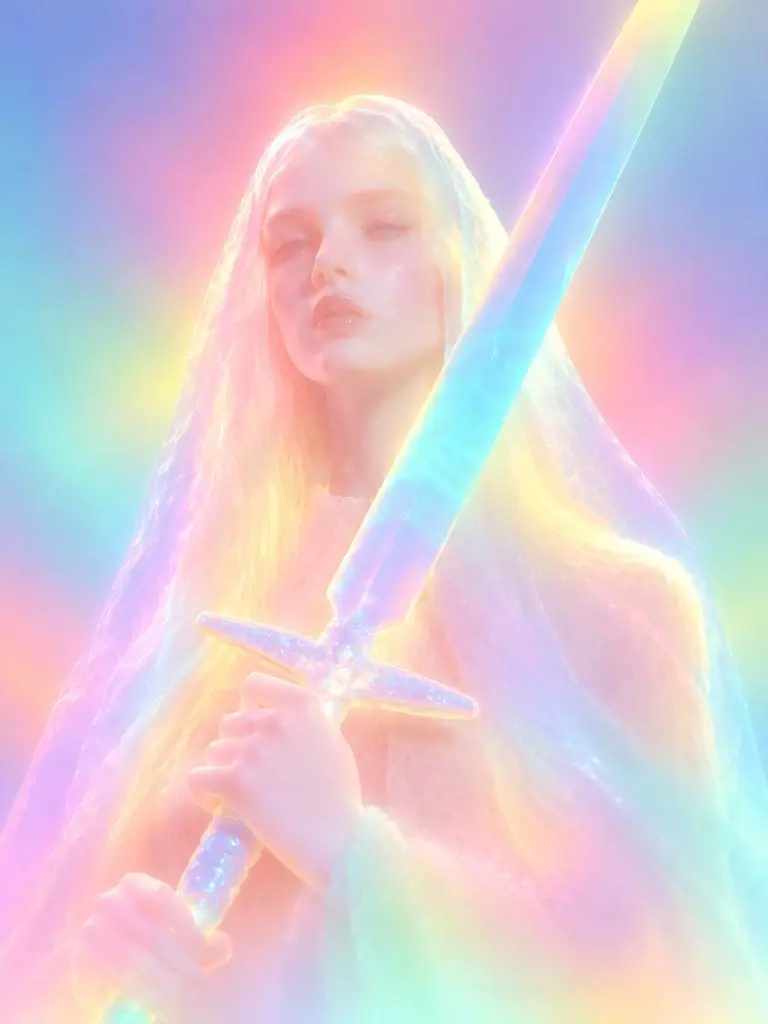
Стилизация под неоновую скульптуру

Трансформация по референсу в светящуюся скульптуру. Рассеянные неоновые цвета, смягчённые детали лица и округлые материалы делают запрошенную стилизацию видимой.

Please transform the input image into a soft focus, neon gradient sculptural style. Do not copy specific specific characters, crowds, compositions, or poses from any reference, but follow this visual language: Style & Texture: Create a soft, dreamy, surreal 3D illustration and digital sculpture. The subject should look like translucent plastic, frosted glass, glowing rubber, or soft ceramic sculpture wrapped in colored mist. Smooth rounded edges, moderately simplified details, with a hazy, low-contrast, non-realistic artistic effect. Color & Light: Use highly saturated but softly diffused neon gradients (fluorescent pink, coral orange, lemon yellow, mint green, cyan, violet, pale grayish-blue). Colors should blend seamlessly like thermal imaging, colored mist, or dream halos. Shadows must be bluish-purple, cyan, or deep magenta—NO pure black hard shadows. Use strong inner glow, backlight, rim light, and ambient color reflections to make the subject glow from within. Include soft focus, slight mist, fine grain, and gradient noise. Subject Treatment: Retain the identity, pose, proportions, and clothing outlines of the input image, but transform them into a minimalist, rounded, dreamy neon sculpture. Soften and weaken facial features to create a quiet, ethereal, detached expression. The face should look like a soft mask covered by a glowing halo. Composition: Clean background (solid color, soft gradient, misty or large color blocks). Quiet, surreal, fairytale-like but slightly alienating atmosphere with a floating feeling. Keywords: soft neon gradient, dreamy 3D illustration, translucent sculpture, frosted glass texture, glowing rubber, pastel fluorescence, diffused light, inner glow, soft focus, blurred facial features, surreal portrait, minimal details, smooth rounded forms, luminous mist, thermal color gradient, ethereal atmosphere, clean composition, high-end digital art.
Используйте эту подсказку
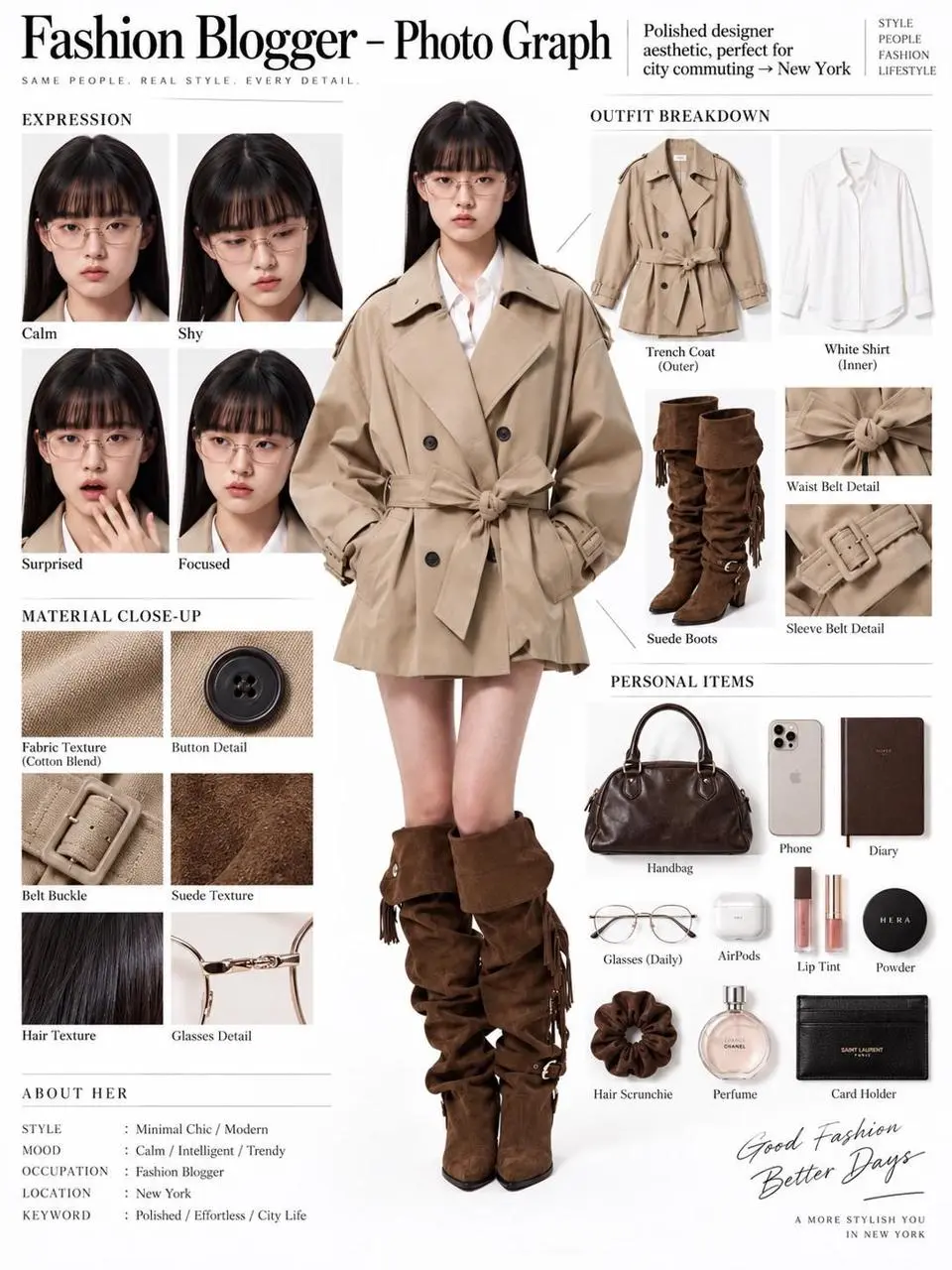
Результат WeShop: Редакционный разбор по референсу
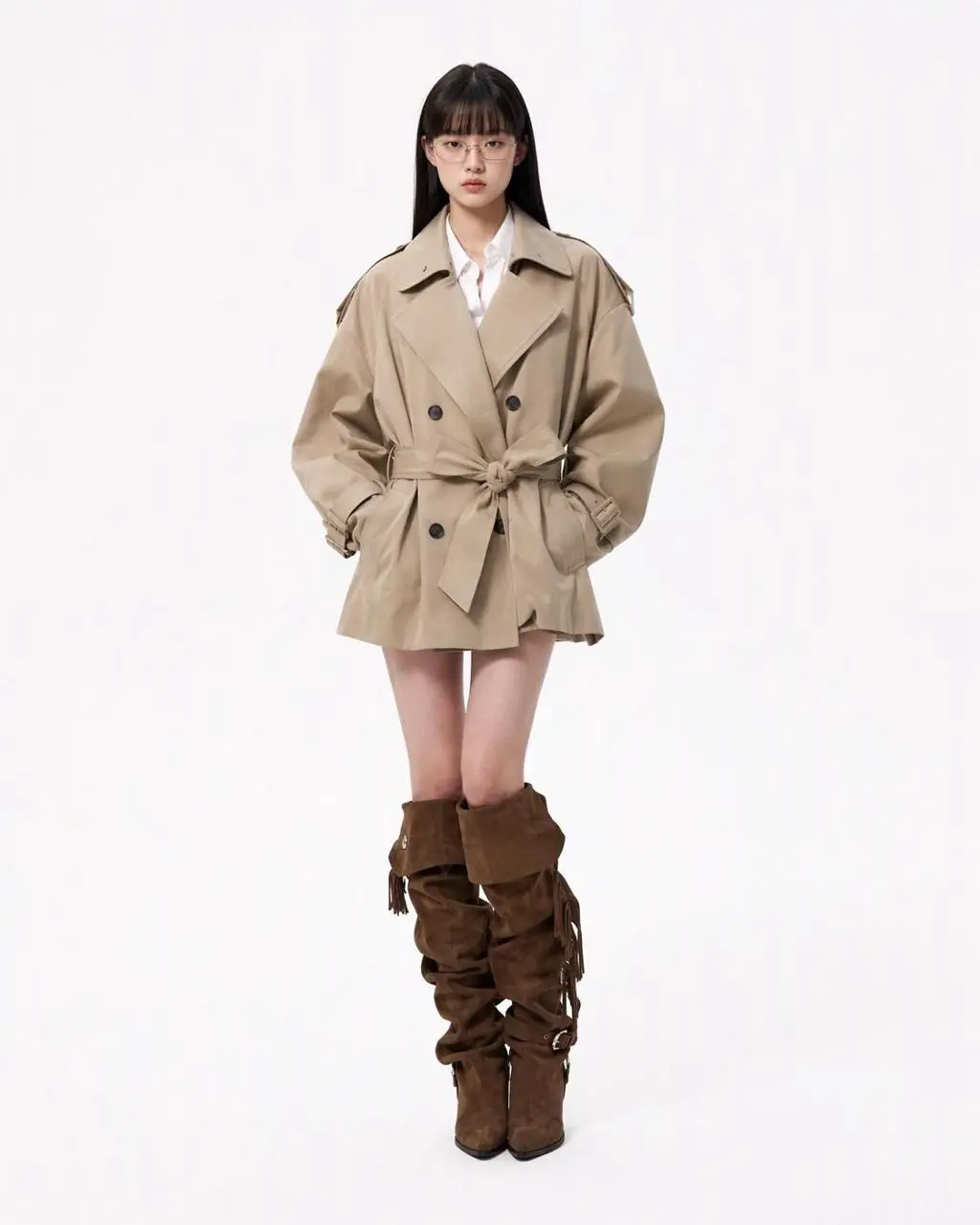
Референс 1

Редакционный разбор по референсу

Один референс человека превращается в редакционный планшет с фигурой в полный рост, частями наряда, крупными планами лица и материалами. Результат объединяет редактирование по референсу и структурированную компоновку в одной композиции.

You are an expert in ultra-detailed, photorealistic character breakdown sheets. Create a highly detailed character reference sheet based on the uploaded person photo. Preserve 100% of the person’s original facial features, identity, hairstyle, clothing, body proportions, and realistic textures. Do not redesign, beautify, or alter the person. TASK: CENTER: Place the full-body photorealistic image of the uploaded person prominently in the center. Keep the person’s original appearance, outfit, proportions, and visual identity exactly consistent with the reference photo. SURROUNDING ELEMENTS: • Outfit Breakdown: Display each clothing item separately, from outer layers to inner layers. Preserve the exact original design, silhouette, colors, materials, patterns, stitching, accessories, and fabric textures. Present each item as realistic product photography. • Expression Variations: Create 3–4 close-up portraits of the same person showing different natural expressions, such as calm, shy, surprised, and focused. The face, hairstyle, skin tone, makeup, and identity must remain fully consistent with the uploaded person. • Material Close-ups: Include realistic macro photography of key details such as fabric texture, stitching, skin texture, hair strands, accessories, buttons, hardware, and other visible materials from the original photo. • Personal Items: Arrange realistic everyday objects that naturally match the person’s fashion style and overall character, such as bag contents, cosmetics, diary, phone, accessories, or other appropriate personal belongings. Present them as premium editorial flat-lay photography. VISUAL GUIDELINES: Layout: Use a clean white background. Position the full-body person as the main visual focus in the center. Arrange all outfit pieces, facial close-ups, material details, and personal items evenly around the central figure. Use thin, refined editorial-style lines to connect relevant details to the person. Style: Hyper-realistic professional photography only. Use natural studio lighting, realistic skin, authentic fabric textures, accurate material reflections, subtle shadows, and premium fashion-editorial photography quality. Overall aesthetic: Clean, sophisticated, modern fashion magazine character analysis board with a New York editorial atmosphere. Maintain a balanced layout, generous white space, and refined visual hierarchy. TEXT: Display the main title: “Fashion Blogger – Photo Graph” Include one short English style/persona judgment: “Polished designer aesthetic, perfect for city commuting → New York” STRICT RULES: The final image MUST look like real photography. NO illustration, anime, cartoon, sketch, painting, CGI, or obvious 3D-rendered appearance. Preserve the uploaded person’s identity, facial structure, facial features, hairstyle, skin tone, clothing, body proportions, and overall appearance as accurately as possible. Do not change, redesign, beautify, replace, or reinterpret the person’s original features. Do not randomly change the clothing design, colors, materials, patterns, or accessories. All facial close-ups must clearly represent the same person. All clothing breakdowns and material close-ups must correspond accurately to the clothing worn by the central person. All surrounding elements must have authentic photographic textures, realistic lighting, and consistent visual quality. Maintain strong visual consistency between the central full-body character and every surrounding detail image.
Используйте эту подсказку
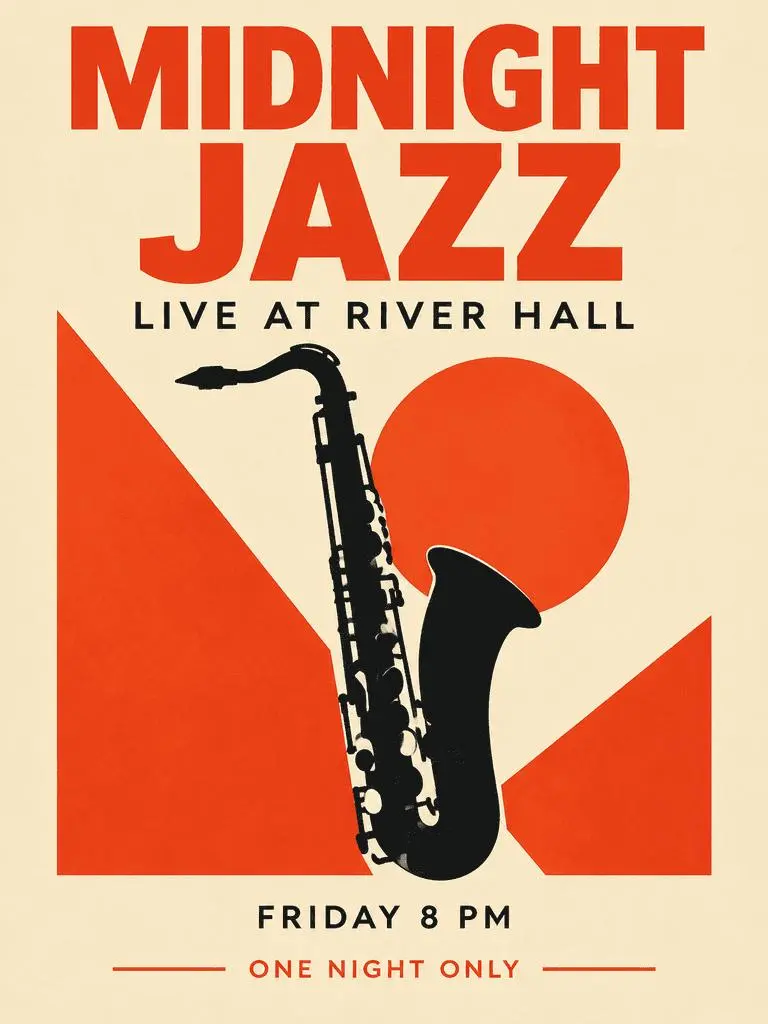
Результат WeShop: Джазовый плакат с акцентом на типографике

Джазовый плакат с акцентом на типографике

Вымышленный плакат события сочетает крупный заголовок, вспомогательные сведения и рисунок саксофона. Проверьте четыре запрошенные фразы и их иерархию в результате.

Create a polished vertical 3:4 poster for a fictional jazz event. Use a warm ivory background, bold vermilion geometric shapes, a single black saxophone silhouette, and a carefully aligned editorial grid. Include exactly these four text lines, with no other words: 'MIDNIGHT JAZZ' as the largest headline, 'LIVE AT RIVER HALL' as the secondary line, 'FRIDAY 8 PM' as the small event detail, and 'ONE NIGHT ONLY' as a small bottom label. Make all four lines legible and spelled exactly. Keep a clear hierarchy between headline, illustration, details, and footer. Flat graphic design, crisp edges, restrained paper texture, no border or watermark.
Используйте эту подсказку
ЧТО ТАКОЕ GPT IMAGE 2?

Что такое GPT Image 2 и для чего подходит?

GPT Image 2 — модель OpenAI для генерации и редактирования изображений. Принимает текст и изображения для новых работ и изменений по референсам. Используйте GPT Image 2 для дизайна по тексту, структурированных композиций и трансформаций референсов. Джазовый плакат демонстрирует иерархию текста, а редакционный планшет и неоновая стилизация — разные способы использования исходных изображений.

Текст в продуманном изображении

Создавайте компоновки со словами и визуальными элементами; проверяйте орфографию и расположение в результате.

Референсы для редактирования

Используйте предоставленное изображение как основу персонажа или сцены и опишите нужное изменение.

Подробные визуальные указания

Задайте композицию, материалы и свет нужного изображения.

РЕЖИМЫ СОЗДАНИЯ

Начните с текста или изображения

Введите текст для новой композиции или загрузите изображения для редактирования по референсам. Объясните, какой вход задаёт персонажа, окружение или компоновку, и что нужно изменить.

Начните с текста

Используйте текстовое задание для новой сцены или дизайна без существующего изображения для сохранения.

Начните с референсов

Загрузите нужные запросу изображения. При нескольких референсах определите роль каждого.

РУКОВОДСТВО ПО ПРОМПТАМ

Как написать промпт для GPT Image 2

Изучайте реальные промпты GPT Image 2 ниже вместе с результатами и референсами, если они есть. Каждое пояснение указывает конкретную инструкцию для проверки; запрошенный эффект не гарантирует совпадения каждой сгенерированной детали.

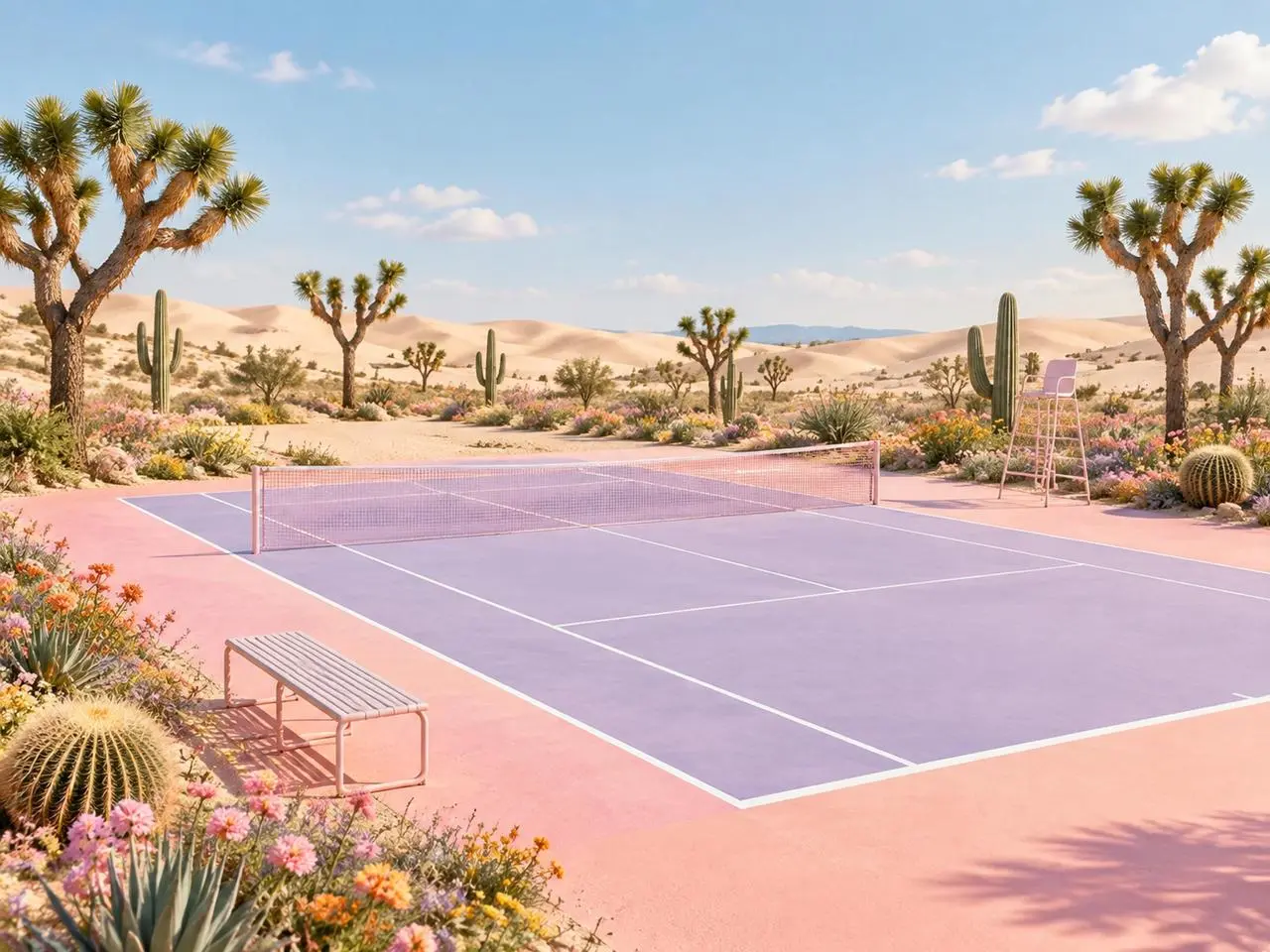
Результат WeShop: определённая роль каждого референса
Референс 1
Референс 2

Назначьте каждому референсу роль

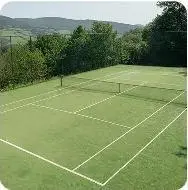
Назовите вклад каждой картинки до описания финальной сцены. В этом примере: “Image 1 is the environment and botanical reference.” Сравните пустынные растения с первым референсом, а геометрию корта — со вторым.

Use the two uploaded images as complementary visual references. REFERENCE ROLES: Image 1 is the environment and botanical reference. Use Image 1 to guide: - the open desert atmosphere - Joshua tree shapes and branching structure - dry natural terrain - scattered desert vegetation - spacious outdoor mood - warm arid landscape identity Image 2 is the composition and tennis-court structure reference. Use Image 2 to guide: - the camera angle - the overall court placement - court proportions - baseline and service-line geometry - the central net position - surrounding open space - the relationship between the court and the landscape Do not copy either image literally. Combine the environmental character of Image 1 with the tennis-court composition of Image 2 to create one coherent new scene. FINAL SCENE: Create a dreamy pastel tennis court located in a surreal desert landscape. The tennis court should use a refined pastel palette with: - soft blush pink outer areas - lavender and pale violet playing surfaces - clean white court lines - a subtle warm peach transition around the edges - a pale pink tennis net with realistic mesh texture Preserve believable tennis-court geometry. Keep the sidelines, baselines, service boxes, center marks, net height and court perspective visually coherent. ENVIRONMENT: Surround the court with rolling cream-colored and pale peach sand dunes. Add several Joshua trees inspired by Image 1, along with tall columnar cacti, round barrel cacti, desert succulents and small flowering plants. Scatter clusters of pink, coral, orange, yellow and lavender desert flowers around the edges of the court. Keep the central playing area clean and unobstructed. Place a simple metal bench near the foreground edge of the court and a minimal referee chair near one side of the net. The furniture should match the scene’s clean editorial styling without blocking the court. LIGHTING AND ATMOSPHERE: Use bright, soft natural daylight under a clear pale-blue sky. Add a few soft white clouds. Use gentle shadows, warm highlights and subtle atmospheric depth across the sand dunes. The mood should feel optimistic, imaginative, premium and calm. STYLE: High-end editorial landscape photography blended with polished surreal advertising art. Pastel color grading, clean commercial composition, realistic materials, precise perspective, crisp court details and refined botanical textures. The result should feel suitable for a sports-fashion campaign, lifestyle brand advertisement, social media post, website hero image or creative editorial. COMPOSITION: Use a wide landscape composition. Keep the tennis court as the central visual focus. Use desert plants and flowers to frame the foreground and side edges. Leave the sky and distant dunes relatively clean to prevent visual clutter. The scene must feel like one naturally designed environment, not a collage of two separate photographs. IMPORTANT: Do not add people or players. Do not add text, logos, signs, watermarks, brand names or promotional badges. Do not create extra tennis nets. Do not distort the court lines or perspective. Do not place cacti, flowers or furniture inside the active playing area. Do not reproduce the exact background from either reference image. Generate a new, coherent pastel desert tennis environment inspired by both references. High-resolution commercial quality, realistic lighting, precise geometry, premium AI-generated campaign visual.
Результат WeShop: изменение материала и стиля
Референс 1

Опишите изменение материала

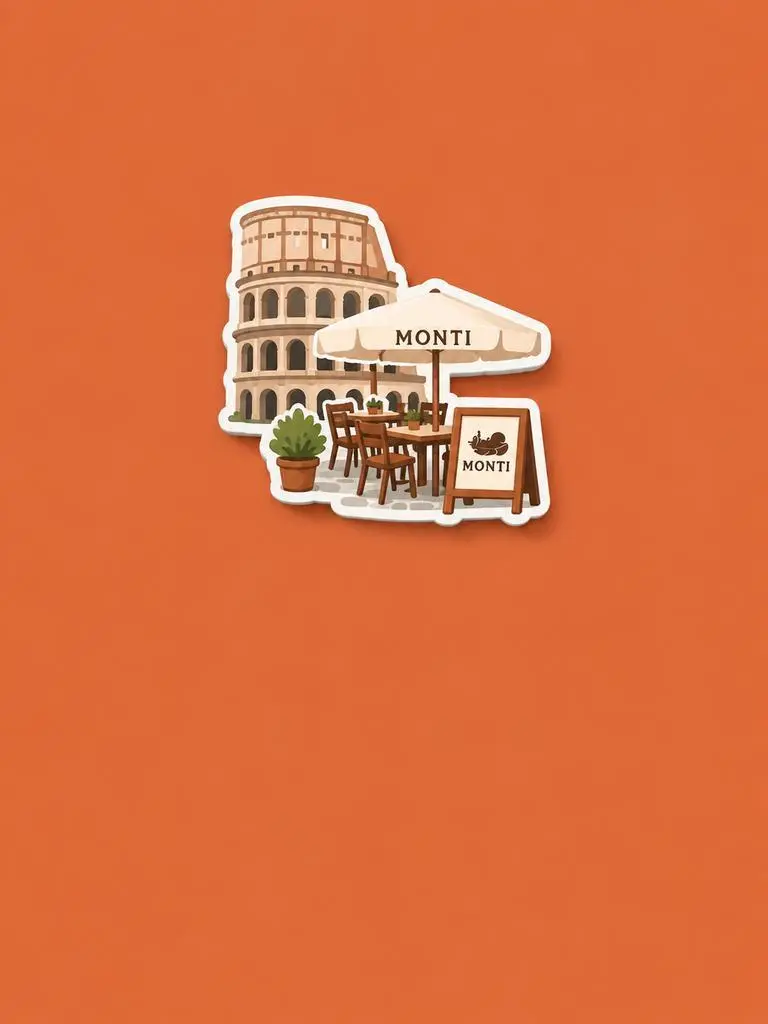
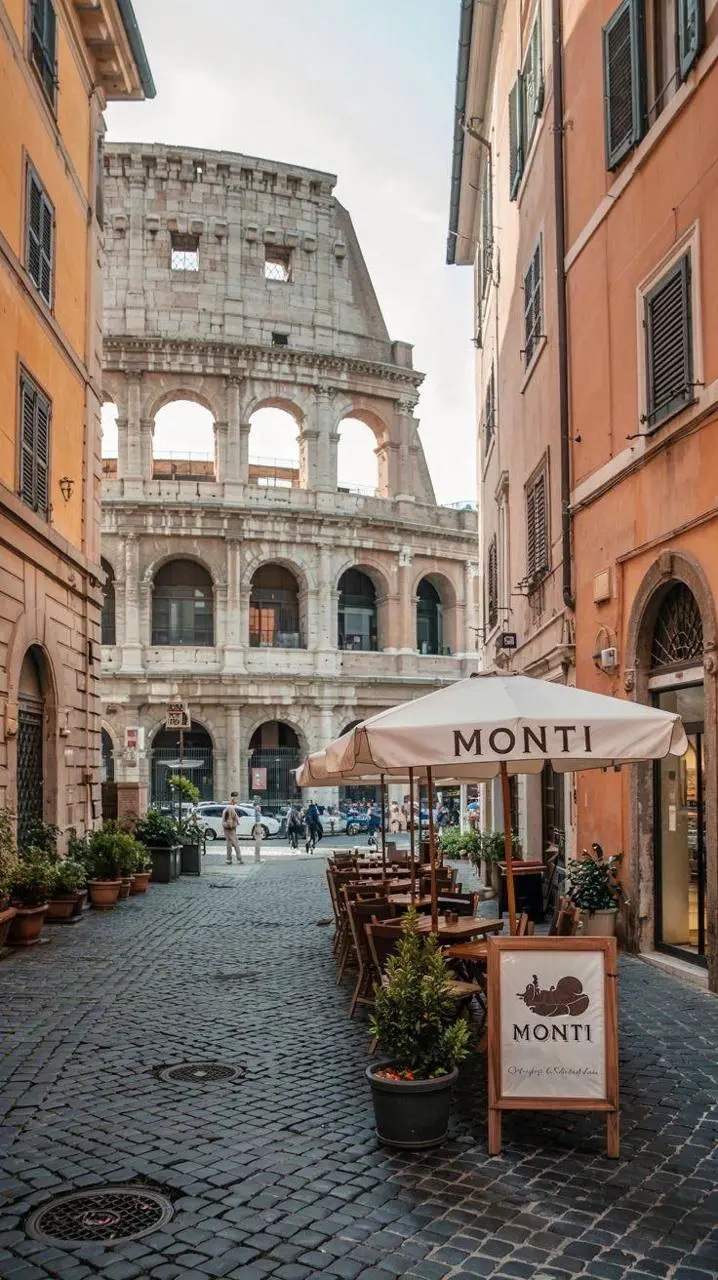
Назовите новый материал или обработку и сохраняемые особенности источника. В этом примере: “Retain the core outline and iconic features of the subject.” Ищите узнаваемое здание и сиденья, переосмысленные в рельефный сувенирный магнит.

Please generate a minimalist fridge magnet photography poster based on the real photo I provided. The overall style should reference "architectural fridge magnets" or "minimalist collage". 【Layout Structure】Horizontal composition, 3:2 ratio. Minimalist solid color background. 【Fridge Magnet Icon】Extract the most recognizable main subject from the provided photo (e.g., the dining table and chairs) and convert it into a minimalist "fridge magnet-style icon". Requirements: 1. Retain the core outline and iconic features of the subject. 2. Simple, clean shape, resembling a cute travel souvenir fridge magnet. 3. Add a slight 3D pop-up effect and a subtle drop shadow. 4. The edges must be clear, with a white or light-colored sticker-like border/stroke. 5. Moderately simplify the details; do not make the drawing too complex or hyper-realistic. 6. Place the icon in the upper center part of the image. 7. The icon should be relatively small and delicate, leaving plenty of negative space around it. 【Background Color】Extract the most prominent, memorable, and saturated color from the provided photo for the background. The background must be a solid, flat color—saturated, clean, and giving a travel postcard vibe. Do NOT use gradients, and do NOT add any complex patterns or background clutter.
Результат WeShop: Разделите персонажа и компоновку
Референс 1
Референс 2
Референс 3

Разделите персонажа и компоновку

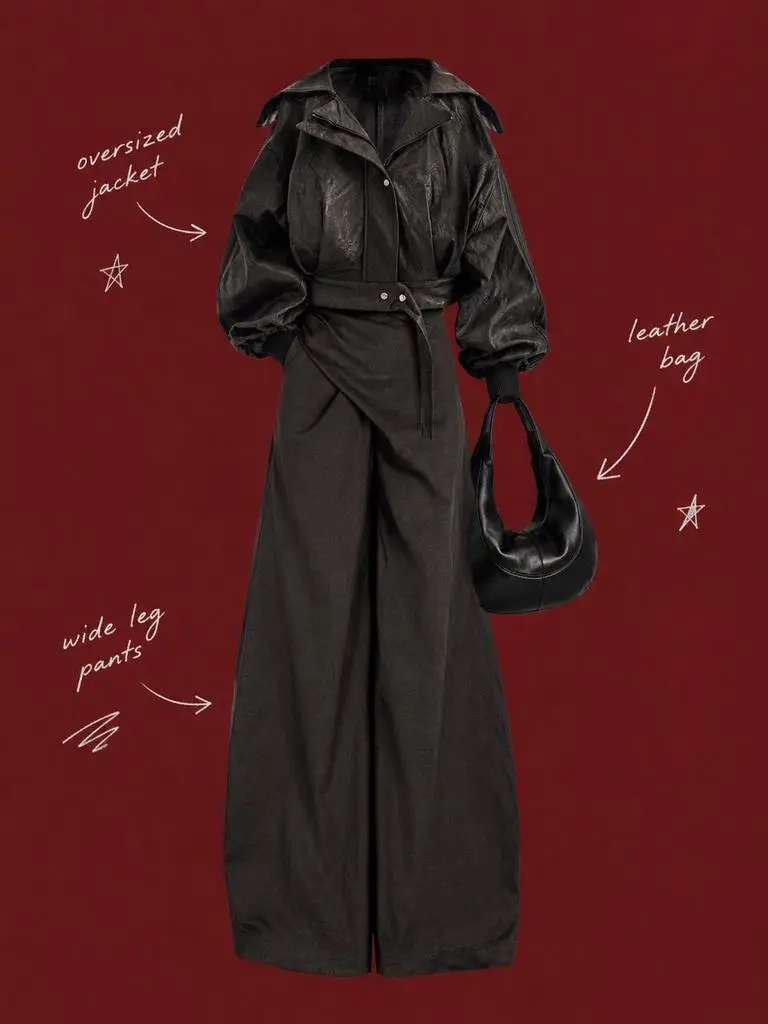
Опишите сохраняемого персонажа и окружающую компоновку разными инструкциями. В этом примере: “Use a solid deep burgundy, dark brick-red, or muted oxidized-red background that fills the entire canvas.” Сравните референсы наряда с центральным силуэтом, затем проверьте редкие подписи вокруг.

Use my uploaded image as the main person or product asset to create a vertical, vintage fashion collage poster. Carefully cut out the subject and place it in the center of the composition. Preserve its recognizable clothing, pose, silhouette, proportions, colors, and important details without changing its identity. Present the subject as a clean magazine-style cutout layered directly onto the background. If the uploaded image features a person, the head may be cropped out or extend beyond the top edge so the visual focus remains on the outfit and body shape. If the subject is a product, keep it complete, clear, and easily recognizable. Use a solid deep burgundy, dark brick-red, or muted oxidized-red background that fills the entire canvas. Do not add a white border, white margins, a paper frame, or empty white space around the poster. Add only a few white handwritten English words, curved arrows, and casual fashion-sketch doodles on the left and right sides of the subject. The arrows may point toward clothing pieces, accessories, or other important details. The writing should look naturally hand-drawn, slightly irregular, and loosely arranged, like annotations in a fashion designer’s sketchbook. Keep these elements sparse and make sure they do not cover the subject. The overall visual language should resemble an independent fashion magazine, a clothing-design scrapbook, or an experimental late-20th-century fashion advertisement. Keep the layout minimal and clear, with one central cutout subject against the red background. Use an approximately 2:3 vertical aspect ratio. The subject should occupy around 75%–85% of the poster’s height and be positioned centrally, slightly toward the bottom. Keep the final image sharp and clearly defined. Do not add torn-paper edges, rough cutout edges, glue marks, tape, folds, stains, fading, film grain, scanning noise, blur, distressed textures, decorative badges, realistic scenery, complex props, modern interface elements, neon lighting, 3D rendering, or overly vivid colors.
Результат WeShop: описание материалов через свет

Назовите материалы и их освещение

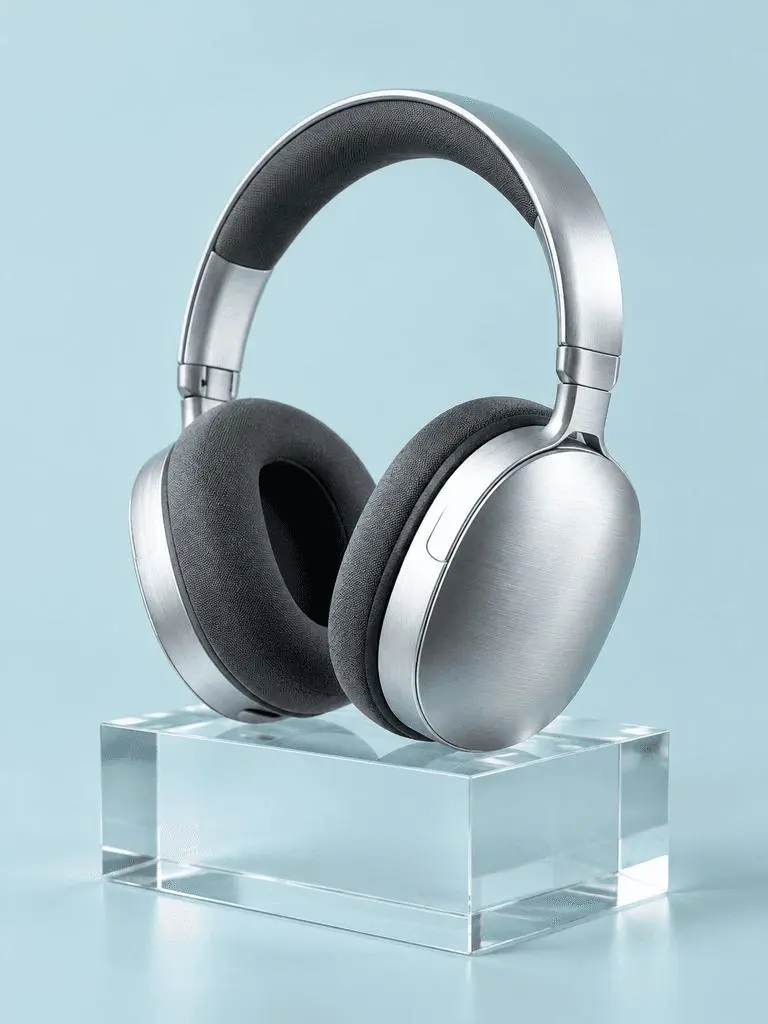
Сопоставьте важные поверхности с видимыми световыми признаками. В этом примере: “a broad softbox reflection across the metal”. Проверьте шлифованный металл наушников, тканевые амбушюры, прозрачный блок и их разную реакцию на свет.

A photorealistic commercial product photograph of one unbranded pair of brushed-silver wireless over-ear headphones. The headphones rest on a clear rectangular glass block against a seamless pale-cyan background. Show fine metal brushing, soft charcoal fabric ear cushions, a realistic transparent block, a clean contact shadow, and a broad softbox reflection across the metal. Use an eye-level three-quarter camera angle and a restrained monochrome palette. One pair of headphones only, no people, letters, logos, packaging, border, or watermark. Vertical 3:4 composition with the whole product visible.
Результат WeShop: организация переднего плана, фона и света

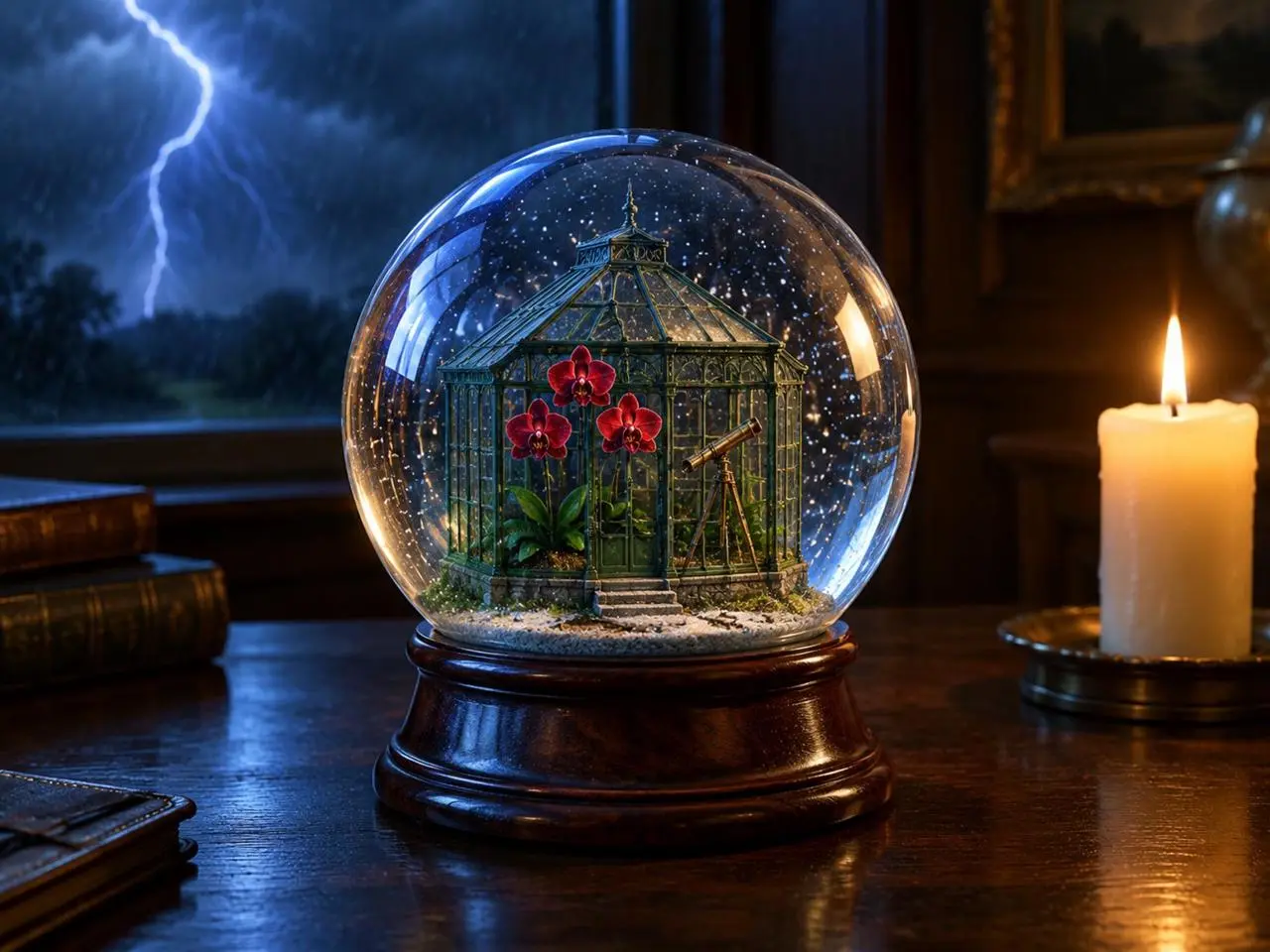
Расположите источники света

Задайте ясные положения главному объекту, событию на фоне и источникам света. В этом примере: “one lit ivory candle on the desk to the right of the globe”. Ищите глобус впереди, молнию позади и тёплую свечу рядом.

Create a finished 3:4 photorealistic editorial image of exactly one clear glass snow globe resting on a dark walnut desk during a thunderstorm. Inside the globe is one miniature Victorian greenhouse containing exactly three red orchids and one small brass telescope. Place a sharp lightning bolt in the upper-left background and one lit ivory candle on the desk to the right of the globe. Use realistic glass reflections and refractions, cool blue storm light from the left, warm candlelight from the right, shallow depth of field, and detailed natural materials. Keep the entire globe visible. No people, no extra flowers, no extra globes, no text, no logo, no watermark.
Результат WeShop: порядок панелей и точные подписи

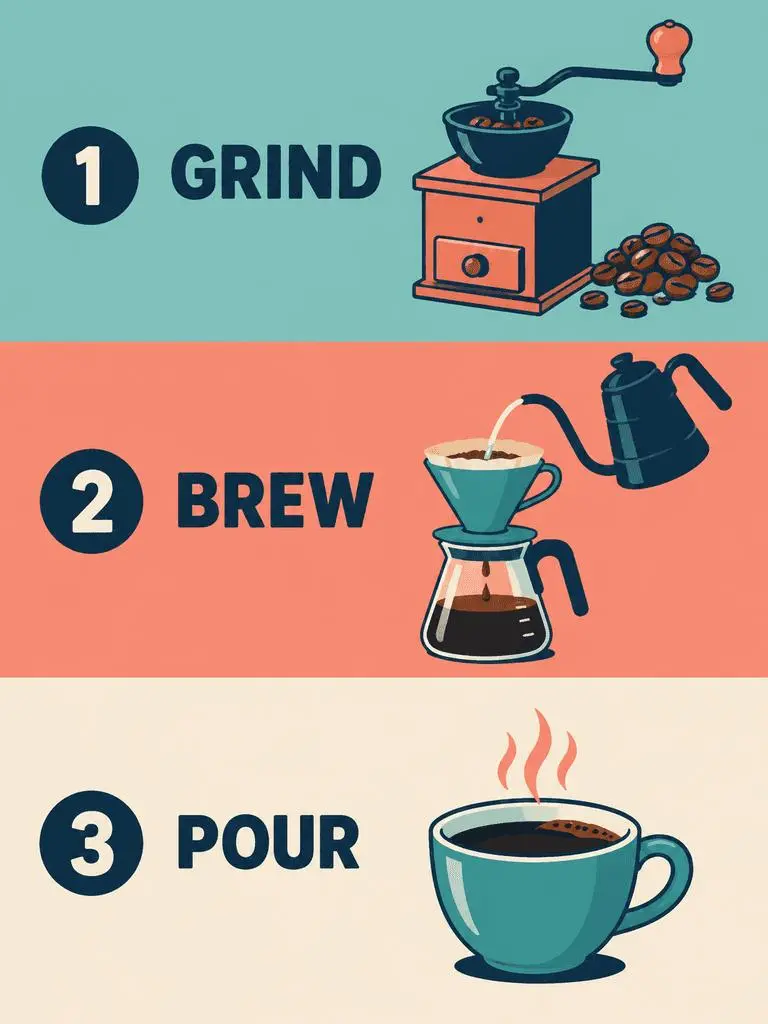
Задайте порядок панелей и точный текст

Для многопанельного дизайна задайте порядок панелей и нужные слова. В этом примере: “Panel 1 shows a simple hand grinder and coffee beans, with the exact heading 'GRIND'.” Сверьте GRIND, BREW и POUR с рисунками и порядком сверху вниз.

Create a clean flat-vector educational infographic in a vertical 3:4 layout with exactly three equal horizontal panels stacked from top to bottom. Panel 1 shows a simple hand grinder and coffee beans, with the exact heading 'GRIND'. Panel 2 shows a pour-over cone over a glass server and a kettle pouring water, with the exact heading 'BREW'. Panel 3 shows a single ceramic cup filled with coffee, with the exact heading 'POUR'. Place the number 1, 2, or 3 beside each corresponding heading. Use teal, coral, cream, and dark-navy colors, consistent line weights, generous spacing, and a left-to-right illustration-and-label arrangement within every panel. Keep the three panels distinct and correctly ordered. No extra text, border, photorealistic imagery, or watermark.
КАК ИСПОЛЬЗОВАТЬ

Как использовать GPT Image 2 в WeShop AI

Начните с выбора GPT Image 2 и указанного ниже способа ввода. Перед отправкой проверьте доступные настройки и баллы.

Предоставьте входные данные для этой модели

Оставьте выбранной GPT Image 2. Для плаката задайте слова и компоновку; для редактирования загрузите источники и определите роли до описания готового изображения.

Проверьте доступные настройки и баллы

Метки размера: 1K, 2K, 4K. Качество: low, medium, high. Соотношения сторон: auto, 1:1, 1:2, 2:1, 1:3, 3:1, 2:3, 3:2, 4:3, 3:4, 16:9, 9:16, 21:9, 9:21. Это выбираемые настройки, а не фиксированные размеры в пикселях или гарантии формата файла. Фактические размеры проверяйте в исходном результате. Перед отправкой проверьте показанные баллы и доступ к модели в своём плане.

Откройте и проверьте результат

Вычитайте текст плаката и проверьте порядок панелей. При редактировании сравните идентичность, геометрию и изменённые области с источником, не предполагая точного совпадения.

СРАВНЕНИЕ МОДЕЛЕЙ GPT IMAGE

GPT Image 2 и GPT Image 2.5

GPT Image 2 отличается от 2.5 Flare и Sunburst. Flare ориентирована на повседневную скорость, Sunburst — на требовательную генерацию и редактирование. Текущая форма GPT Image 2 предлагает Low, Medium и High, а входы 2.5 дополнительно XHigh и Max. Официальное позиционирование, каталог конфигураций WeShop и текущая выбранная форма — разные вещи; измеренного рейтинга качества или скорости здесь нет.

ПараметрGPT Image 2GPT Image 2.5
Варианты моделиGPT Image 2Flare для скорости; Sunburst для высоких требований к качеству
Создание и редактированиеТекстовые промпты и редактирование по изображениямТекстовые промпты и редактирование по изображениям
Акцент редактированияВходные изображения высокой точности для генерации и редактированияOpenAI сообщает об улучшенном точном редактировании и сохранении персонажей в обоих вариантах
Уровни качества в WeShopLow, Medium, HighLow, Medium, High, XHigh, Max
Размеры изображений в WeShop1K, 2K, 4K1K, 2K, 4K
Форматы 4:5 и 5:4 в WeShopНе указаны в текущей формеДоступны и для Flare, и для Sunburst
Варианты модели
GPT Image 2
GPT Image 2
GPT Image 2.5
Flare для скорости; Sunburst для высоких требований к качеству
Создание и редактирование
GPT Image 2
Текстовые промпты и редактирование по изображениям
GPT Image 2.5
Текстовые промпты и редактирование по изображениям
Акцент редактирования
GPT Image 2
Входные изображения высокой точности для генерации и редактирования
GPT Image 2.5
OpenAI сообщает об улучшенном точном редактировании и сохранении персонажей в обоих вариантах
Уровни качества в WeShop
GPT Image 2
Low, Medium, High
GPT Image 2.5
Low, Medium, High, XHigh, Max
Размеры изображений в WeShop
GPT Image 2
1K, 2K, 4K
GPT Image 2.5
1K, 2K, 4K
Форматы 4:5 и 5:4 в WeShop
GPT Image 2
Не указаны в текущей форме
GPT Image 2.5
Доступны и для Flare, и для Sunburst

Когда оставить GPT Image 2

Используйте GPT Image 2 для дизайна по тексту, структурированных композиций или редактирования по референсам, если результат отвечает заданию. Форма WeShop предлагает Low, Medium и High.

Когда попробовать GPT Image 2.5

Рассмотрите Flare, если важна скорость, или Sunburst для высоких требований к качеству, следуя позиционированию OpenAI. Обе модели также имеют XHigh и Max в текущей форме WeShop. Сравните одинаковые показательные входы перед сменой сложившегося процесса.

ДРУГИЕ МОДЕЛИ ИЗОБРАЖЕНИЙ

Изучите другие модели изображений

Откройте страницы других моделей и изучите их собственные примеры и доступные процессы.

Частые вопросы

Вопросы о GPT Image 2

Что такое GPT Image 2?

GPT Image 2 — модель OpenAI для генерации и редактирования изображений. Принимает текст и изображения для новых работ и изменений по референсам.

Для чего подходит GPT Image 2?

Используйте GPT Image 2 для дизайна по тексту, структурированных композиций и трансформаций референсов. Джазовый плакат демонстрирует иерархию текста, а редакционный планшет и неоновая стилизация — разные способы использования исходных изображений.

Какие входные данные нужны GPT Image 2?

Введите текст для новой композиции или загрузите изображения для редактирования по референсам. Объясните, какой вход задаёт персонажа, окружение или компоновку, и что нужно изменить.

Какие настройки размера и соотношения сторон доступны?

Метки размера: 1K, 2K, 4K. Качество: low, medium, high. Соотношения сторон: auto, 1:1, 1:2, 2:1, 1:3, 3:1, 2:3, 3:2, 4:3, 3:4, 16:9, 9:16, 21:9, 9:21. Это выбираемые настройки, а не фиксированные размеры в пикселях или гарантии формата файла. Фактические размеры проверяйте в исходном результате.

Как написать промпт для GPT Image 2?

Назовите вклад каждой картинки до описания финальной сцены. В этом примере: “Image 1 is the environment and botanical reference.” Сравните пустынные растения с первым референсом, а геометрию корта — со вторым. Прочитайте полный парный промпт и фактические входные данные в руководстве, затем адаптируйте их под свою задачу.

Чем GPT Image 2 отличается от связанных моделей?

GPT Image 2 отличается от 2.5 Flare и Sunburst. Flare ориентирована на повседневную скорость, Sunburst — на требовательную генерацию и редактирование. Текущая форма GPT Image 2 предлагает Low, Medium и High, а входы 2.5 дополнительно XHigh и Max.

Бесплатна ли GPT Image 2 и как оплачивается использование?

Текущая страница тарифов WeShop не включает эту модель в Free Trial. Проверьте доступ платного плана и оценку баллов для своего запроса. Страница не указывает фиксированную цену запроса и не переносит квоту подписки другого поставщика на WeShop.

Какие ограничения нужно учитывать?

Проверьте нужные слова, детали лица, геометрию продукта и границу каждой правки. Инструкция сохранить деталь сама не доказывает её сохранение. Вычитайте текст плаката и порядок панелей. При редактировании сравните идентичность, геометрию и изменённые области с источником, не предполагая точного совпадения.

Чему можно научиться на примерах этой страницы?

Сохранённые примеры GPT Image 2 показывают: Стилизация под неоновую скульптуру; Редакционный разбор по референсу; Джазовый плакат с акцентом на типографике. Сопоставьте результат с реальным промптом и доступными входами. Пример иллюстрирует один запрос, а не гарантированный результат или показатель успешности.