GPT IMAGE 2 이미지 제작

GPT Image 2 AI 이미지 생성

GPT Image 2는 OpenAI의 이미지 생성·편집 모델입니다. 텍스트와 이미지 입력으로 새 이미지를 만들거나 참조 기반 변경을 수행합니다.

gpt-image-2
GPT IMAGE 2 예시

GPT Image 2 이미지 예시

GPT Image 2 모델을 네온 조각상 스타일 변환, 참조 이미지에서 에디토리얼 보드로, 타이포그래피 중심 재즈 포스터 예시로 살펴보세요. 각 저장 사례는 실제 프롬프트와 사용 가능한 입력을 유지합니다. 자신의 피사체에 맞게 요청을 수정하기 전에 결과를 확인하세요.

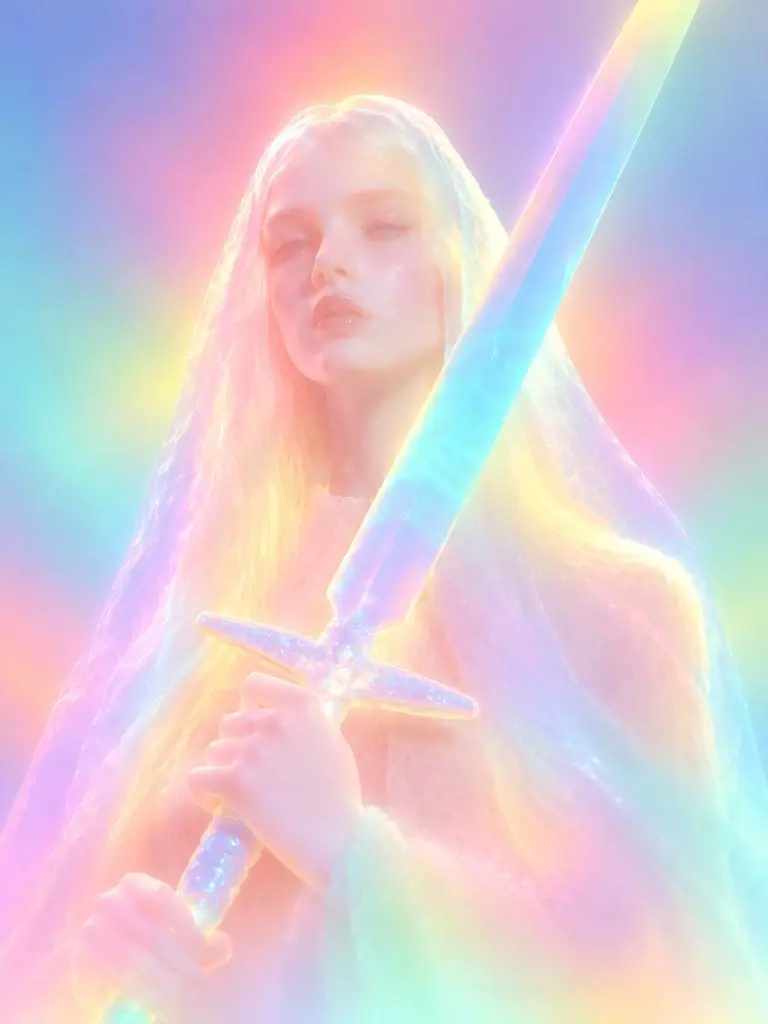
WeShop 결과: 네온 조각상 스타일 변환
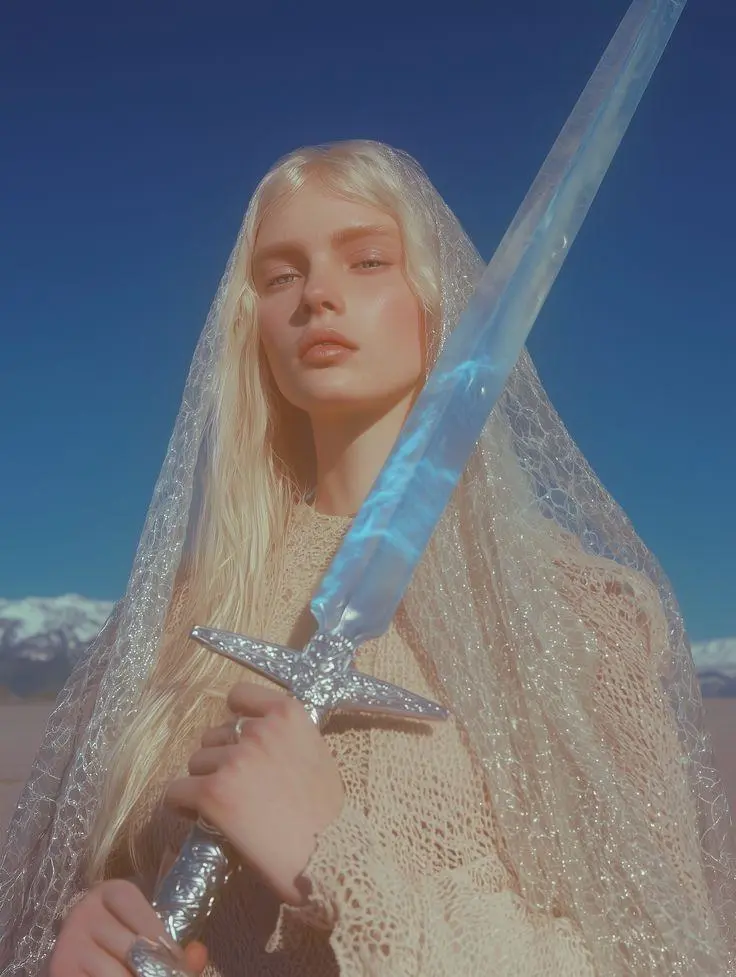
참조 1

네온 조각상 스타일 변환

참조 이미지를 빛나는 조각상으로 변환합니다. 확산된 네온 색상, 부드러워진 얼굴 디테일, 둥근 소재 표현으로 요청한 스타일 변화를 보여 줍니다.

Please transform the input image into a soft focus, neon gradient sculptural style. Do not copy specific specific characters, crowds, compositions, or poses from any reference, but follow this visual language: Style & Texture: Create a soft, dreamy, surreal 3D illustration and digital sculpture. The subject should look like translucent plastic, frosted glass, glowing rubber, or soft ceramic sculpture wrapped in colored mist. Smooth rounded edges, moderately simplified details, with a hazy, low-contrast, non-realistic artistic effect. Color & Light: Use highly saturated but softly diffused neon gradients (fluorescent pink, coral orange, lemon yellow, mint green, cyan, violet, pale grayish-blue). Colors should blend seamlessly like thermal imaging, colored mist, or dream halos. Shadows must be bluish-purple, cyan, or deep magenta—NO pure black hard shadows. Use strong inner glow, backlight, rim light, and ambient color reflections to make the subject glow from within. Include soft focus, slight mist, fine grain, and gradient noise. Subject Treatment: Retain the identity, pose, proportions, and clothing outlines of the input image, but transform them into a minimalist, rounded, dreamy neon sculpture. Soften and weaken facial features to create a quiet, ethereal, detached expression. The face should look like a soft mask covered by a glowing halo. Composition: Clean background (solid color, soft gradient, misty or large color blocks). Quiet, surreal, fairytale-like but slightly alienating atmosphere with a floating feeling. Keywords: soft neon gradient, dreamy 3D illustration, translucent sculpture, frosted glass texture, glowing rubber, pastel fluorescence, diffused light, inner glow, soft focus, blurred facial features, surreal portrait, minimal details, smooth rounded forms, luminous mist, thermal color gradient, ethereal atmosphere, clean composition, high-end digital art.
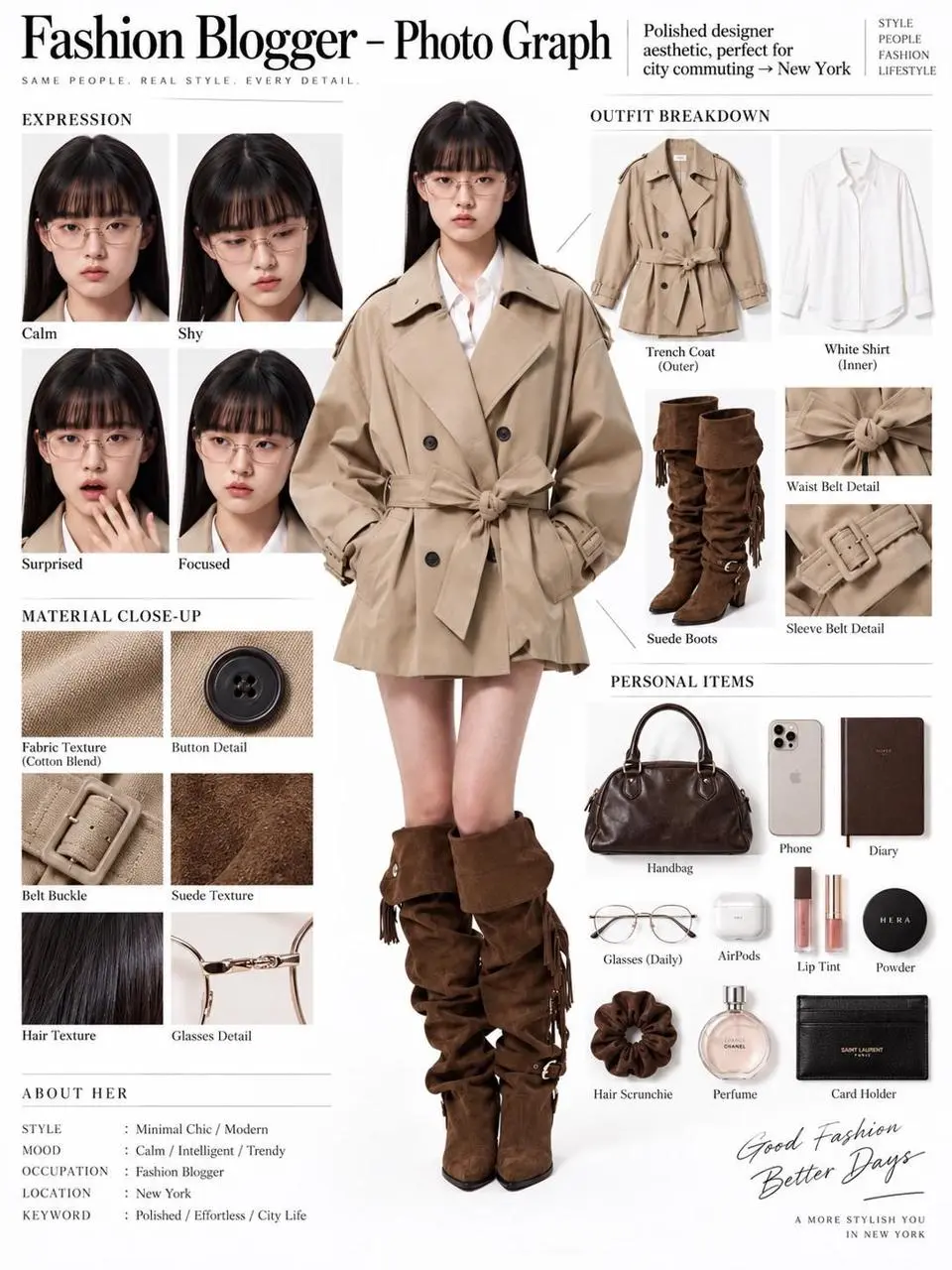
WeShop 결과: 참조 이미지에서 에디토리얼 보드로
참조 1

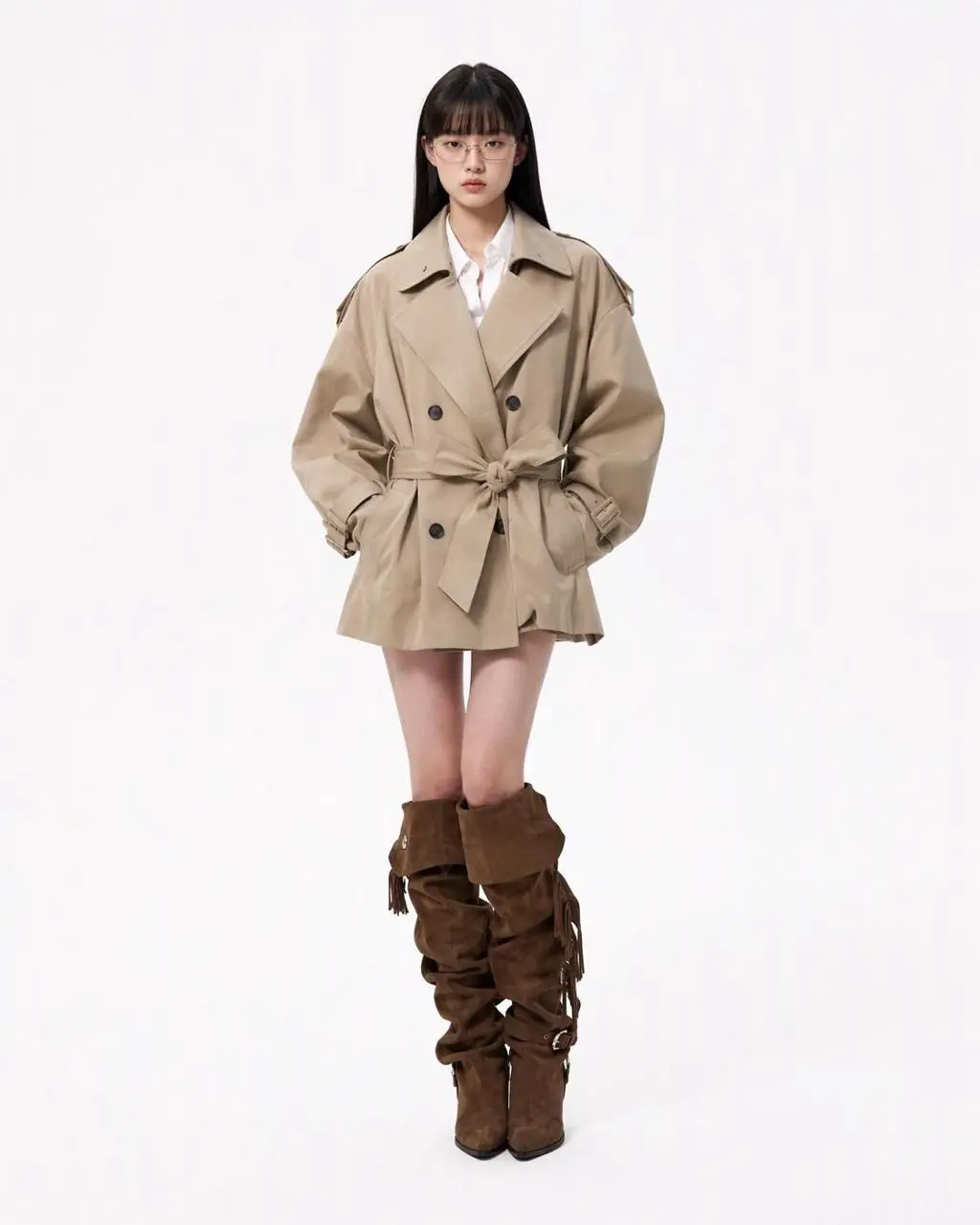
참조 이미지에서 에디토리얼 보드로

한 사람의 참조 이미지를 전신 인물, 의상 조각, 얼굴 클로즈업, 소재 디테일이 있는 에디토리얼 보드로 만듭니다. 참조 편집과 구조화된 레이아웃을 하나의 구도에 결합합니다.

You are an expert in ultra-detailed, photorealistic character breakdown sheets. Create a highly detailed character reference sheet based on the uploaded person photo. Preserve 100% of the person’s original facial features, identity, hairstyle, clothing, body proportions, and realistic textures. Do not redesign, beautify, or alter the person. TASK: CENTER: Place the full-body photorealistic image of the uploaded person prominently in the center. Keep the person’s original appearance, outfit, proportions, and visual identity exactly consistent with the reference photo. SURROUNDING ELEMENTS: • Outfit Breakdown: Display each clothing item separately, from outer layers to inner layers. Preserve the exact original design, silhouette, colors, materials, patterns, stitching, accessories, and fabric textures. Present each item as realistic product photography. • Expression Variations: Create 3–4 close-up portraits of the same person showing different natural expressions, such as calm, shy, surprised, and focused. The face, hairstyle, skin tone, makeup, and identity must remain fully consistent with the uploaded person. • Material Close-ups: Include realistic macro photography of key details such as fabric texture, stitching, skin texture, hair strands, accessories, buttons, hardware, and other visible materials from the original photo. • Personal Items: Arrange realistic everyday objects that naturally match the person’s fashion style and overall character, such as bag contents, cosmetics, diary, phone, accessories, or other appropriate personal belongings. Present them as premium editorial flat-lay photography. VISUAL GUIDELINES: Layout: Use a clean white background. Position the full-body person as the main visual focus in the center. Arrange all outfit pieces, facial close-ups, material details, and personal items evenly around the central figure. Use thin, refined editorial-style lines to connect relevant details to the person. Style: Hyper-realistic professional photography only. Use natural studio lighting, realistic skin, authentic fabric textures, accurate material reflections, subtle shadows, and premium fashion-editorial photography quality. Overall aesthetic: Clean, sophisticated, modern fashion magazine character analysis board with a New York editorial atmosphere. Maintain a balanced layout, generous white space, and refined visual hierarchy. TEXT: Display the main title: “Fashion Blogger – Photo Graph” Include one short English style/persona judgment: “Polished designer aesthetic, perfect for city commuting → New York” STRICT RULES: The final image MUST look like real photography. NO illustration, anime, cartoon, sketch, painting, CGI, or obvious 3D-rendered appearance. Preserve the uploaded person’s identity, facial structure, facial features, hairstyle, skin tone, clothing, body proportions, and overall appearance as accurately as possible. Do not change, redesign, beautify, replace, or reinterpret the person’s original features. Do not randomly change the clothing design, colors, materials, patterns, or accessories. All facial close-ups must clearly represent the same person. All clothing breakdowns and material close-ups must correspond accurately to the clothing worn by the central person. All surrounding elements must have authentic photographic textures, realistic lighting, and consistent visual quality. Maintain strong visual consistency between the central full-body character and every surrounding detail image.
WeShop 결과: 타이포그래피 중심 재즈 포스터

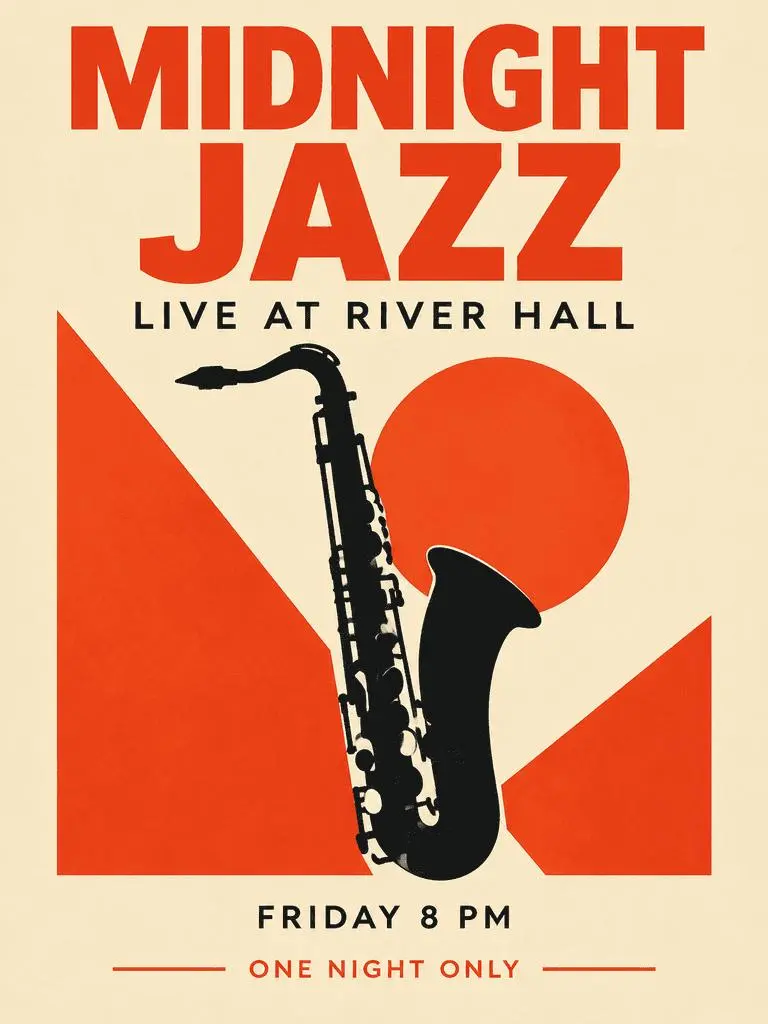
타이포그래피 중심 재즈 포스터

주요 제목, 보조 정보, 색소폰 일러스트를 결합한 가상 행사 포스터입니다. 결과에서 요청한 네 문구와 정보 위계를 확인하세요.

Create a polished vertical 3:4 poster for a fictional jazz event. Use a warm ivory background, bold vermilion geometric shapes, a single black saxophone silhouette, and a carefully aligned editorial grid. Include exactly these four text lines, with no other words: 'MIDNIGHT JAZZ' as the largest headline, 'LIVE AT RIVER HALL' as the secondary line, 'FRIDAY 8 PM' as the small event detail, and 'ONE NIGHT ONLY' as a small bottom label. Make all four lines legible and spelled exactly. Keep a clear hierarchy between headline, illustration, details, and footer. Flat graphic design, crisp edges, restrained paper texture, no border or watermark.
GPT IMAGE 2 모델 소개

GPT Image 2 모델은 무엇이며 어떤 작업에 활용하나요?

GPT Image 2는 OpenAI의 이미지 생성·편집 모델입니다. 텍스트와 이미지 입력으로 새 이미지를 만들거나 참조 기반 변경을 수행합니다. GPT Image 2를 텍스트 중심 디자인, 구조화된 구도, 참조 변환에 사용하세요. 재즈 포스터는 계획된 텍스트 위계를, 에디토리얼 보드와 네온 스타일 변경은 원본 이미지의 서로 다른 활용을 보여 줍니다.

디자인 이미지 안의 텍스트

문구와 시각 요소가 포함된 레이아웃을 만들고 결과의 철자와 배치를 확인하세요.

이미지 편집용 참조

제공한 이미지로 피사체나 장면을 정하고 요청할 변경을 설명하세요.

상세한 시각 연출

원하는 이미지의 구도, 소재, 조명을 지정하세요.

제작 방식

텍스트 또는 이미지로 시작하기

새 구도는 텍스트를 입력하고 참조 기반 편집은 이미지를 업로드하세요. 피사체, 환경, 레이아웃을 제공하는 입력을 설명하고 바꿀 부분을 지정하세요.

텍스트로 시작하기

유지할 기존 이미지 없이 새 장면이나 디자인을 만들 때 설명문을 사용하세요.

참조 이미지로 시작하기

요청에 사용할 이미지를 업로드하세요. 여러 장을 제공한다면 각 참조 이미지의 역할을 지정하세요.

프롬프트 가이드

GPT Image 2 프롬프트 작성 방법

아래의 실제 GPT Image 2 프롬프트를 결과 및 사용한 참조 입력과 함께 살펴보세요. 각 설명은 확인할 특정 지시를 짚어 줍니다. 효과를 요청했다고 해서 생성된 모든 디테일이 일치한다는 보장은 없습니다.

WeShop 결과: 각 참조 이미지에 명확한 역할 지정
참조 1
참조 2

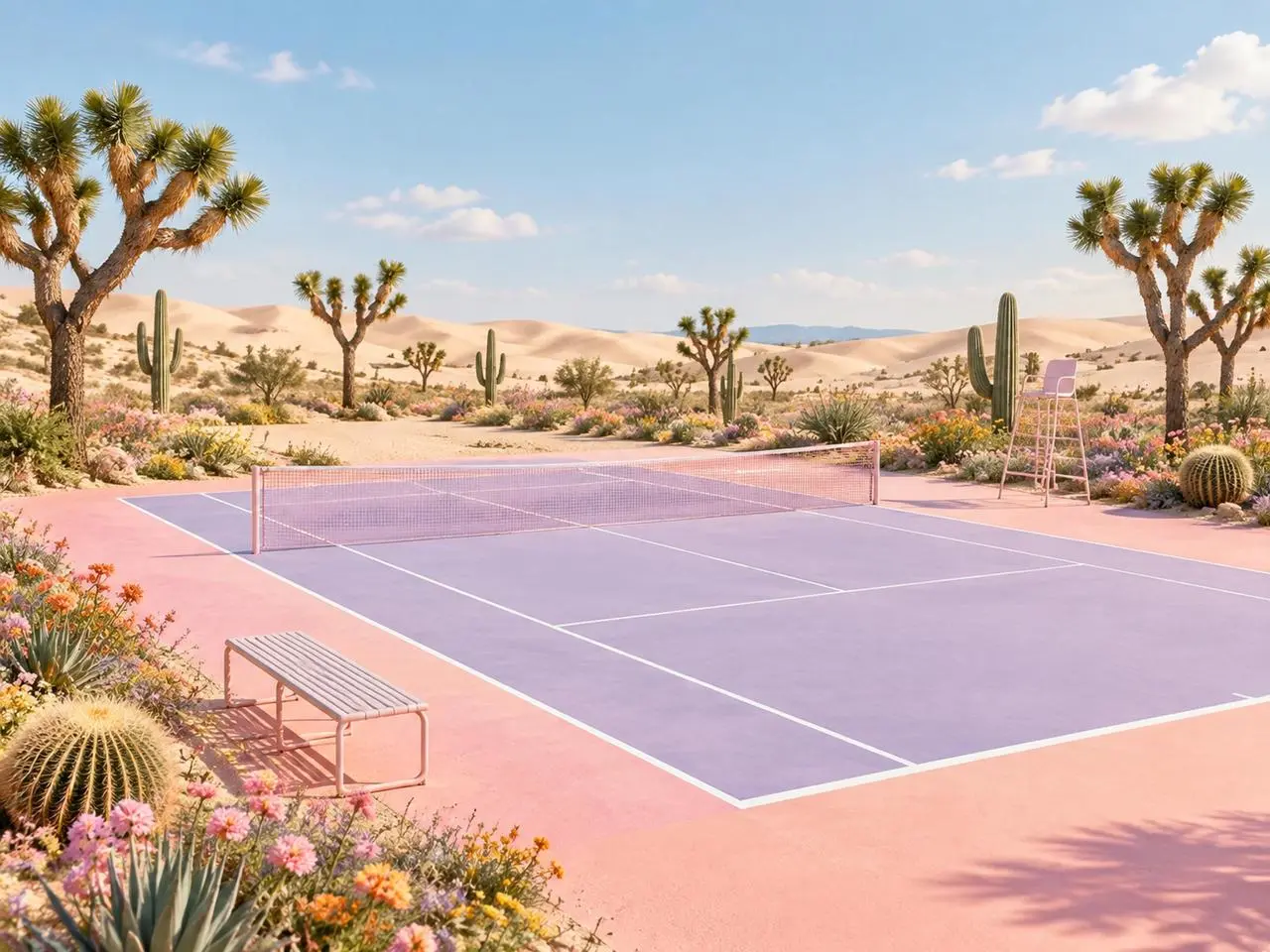
각 참조 이미지에 역할 지정하기

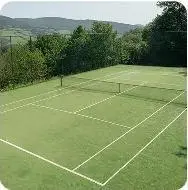
최종 장면을 설명하기 전에 각 이미지가 제공하는 요소를 명시하세요. 이 예시의 문구는 “Image 1 is the environment and botanical reference.”입니다. 사막 식물은 첫 참조와, 코트 형태는 두 번째 참조와 비교하세요.

Use the two uploaded images as complementary visual references. REFERENCE ROLES: Image 1 is the environment and botanical reference. Use Image 1 to guide: - the open desert atmosphere - Joshua tree shapes and branching structure - dry natural terrain - scattered desert vegetation - spacious outdoor mood - warm arid landscape identity Image 2 is the composition and tennis-court structure reference. Use Image 2 to guide: - the camera angle - the overall court placement - court proportions - baseline and service-line geometry - the central net position - surrounding open space - the relationship between the court and the landscape Do not copy either image literally. Combine the environmental character of Image 1 with the tennis-court composition of Image 2 to create one coherent new scene. FINAL SCENE: Create a dreamy pastel tennis court located in a surreal desert landscape. The tennis court should use a refined pastel palette with: - soft blush pink outer areas - lavender and pale violet playing surfaces - clean white court lines - a subtle warm peach transition around the edges - a pale pink tennis net with realistic mesh texture Preserve believable tennis-court geometry. Keep the sidelines, baselines, service boxes, center marks, net height and court perspective visually coherent. ENVIRONMENT: Surround the court with rolling cream-colored and pale peach sand dunes. Add several Joshua trees inspired by Image 1, along with tall columnar cacti, round barrel cacti, desert succulents and small flowering plants. Scatter clusters of pink, coral, orange, yellow and lavender desert flowers around the edges of the court. Keep the central playing area clean and unobstructed. Place a simple metal bench near the foreground edge of the court and a minimal referee chair near one side of the net. The furniture should match the scene’s clean editorial styling without blocking the court. LIGHTING AND ATMOSPHERE: Use bright, soft natural daylight under a clear pale-blue sky. Add a few soft white clouds. Use gentle shadows, warm highlights and subtle atmospheric depth across the sand dunes. The mood should feel optimistic, imaginative, premium and calm. STYLE: High-end editorial landscape photography blended with polished surreal advertising art. Pastel color grading, clean commercial composition, realistic materials, precise perspective, crisp court details and refined botanical textures. The result should feel suitable for a sports-fashion campaign, lifestyle brand advertisement, social media post, website hero image or creative editorial. COMPOSITION: Use a wide landscape composition. Keep the tennis court as the central visual focus. Use desert plants and flowers to frame the foreground and side edges. Leave the sky and distant dunes relatively clean to prevent visual clutter. The scene must feel like one naturally designed environment, not a collage of two separate photographs. IMPORTANT: Do not add people or players. Do not add text, logos, signs, watermarks, brand names or promotional badges. Do not create extra tennis nets. Do not distort the court lines or perspective. Do not place cacti, flowers or furniture inside the active playing area. Do not reproduce the exact background from either reference image. Generate a new, coherent pastel desert tennis environment inspired by both references. High-resolution commercial quality, realistic lighting, precise geometry, premium AI-generated campaign visual.
WeShop 결과: 소재와 스타일 변화 설명
참조 1

소재 변화 설명하기

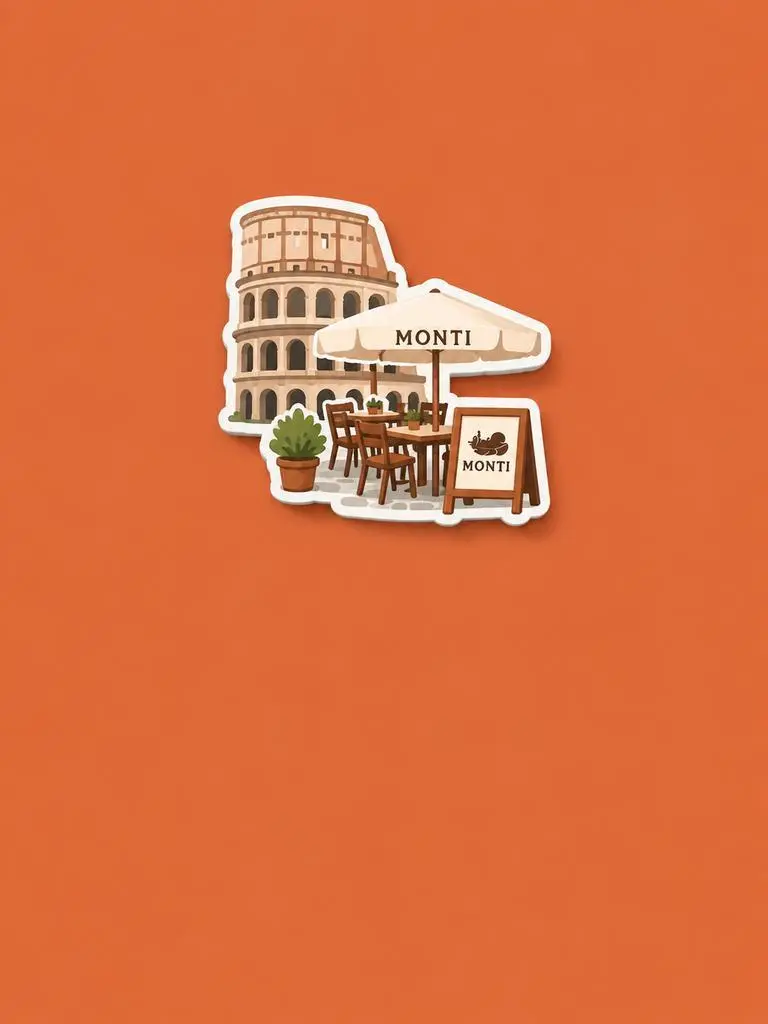
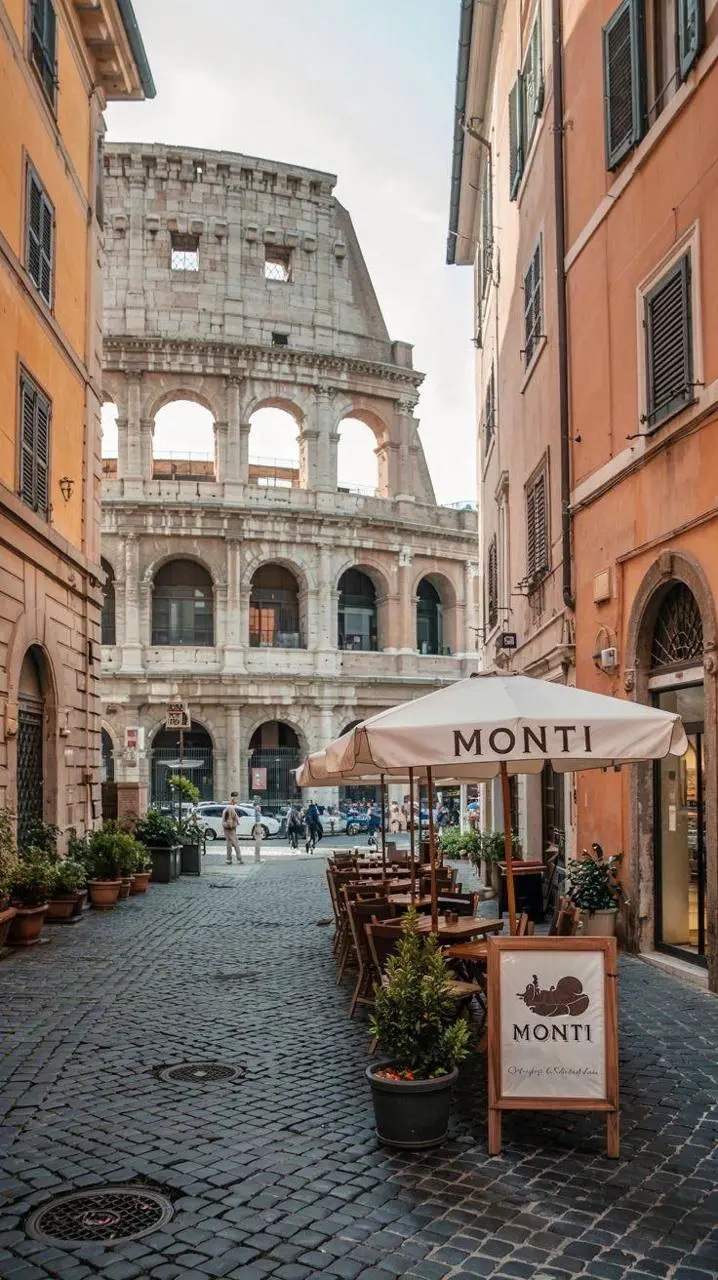
새 소재나 표현을 명시하고 유지할 원본 특징을 지정하세요. 이 예시의 문구는 “Retain the core outline and iconic features of the subject.”입니다. 알아볼 수 있는 건물과 좌석이 입체적인 기념품 자석으로 재해석되었는지 확인하세요.

Please generate a minimalist fridge magnet photography poster based on the real photo I provided. The overall style should reference "architectural fridge magnets" or "minimalist collage". 【Layout Structure】Horizontal composition, 3:2 ratio. Minimalist solid color background. 【Fridge Magnet Icon】Extract the most recognizable main subject from the provided photo (e.g., the dining table and chairs) and convert it into a minimalist "fridge magnet-style icon". Requirements: 1. Retain the core outline and iconic features of the subject. 2. Simple, clean shape, resembling a cute travel souvenir fridge magnet. 3. Add a slight 3D pop-up effect and a subtle drop shadow. 4. The edges must be clear, with a white or light-colored sticker-like border/stroke. 5. Moderately simplify the details; do not make the drawing too complex or hyper-realistic. 6. Place the icon in the upper center part of the image. 7. The icon should be relatively small and delicate, leaving plenty of negative space around it. 【Background Color】Extract the most prominent, memorable, and saturated color from the provided photo for the background. The background must be a solid, flat color—saturated, clean, and giving a travel postcard vibe. Do NOT use gradients, and do NOT add any complex patterns or background clutter.
WeShop 결과: 피사체와 레이아웃 구분하기
참조 1
참조 2
참조 3

피사체와 레이아웃 구분하기

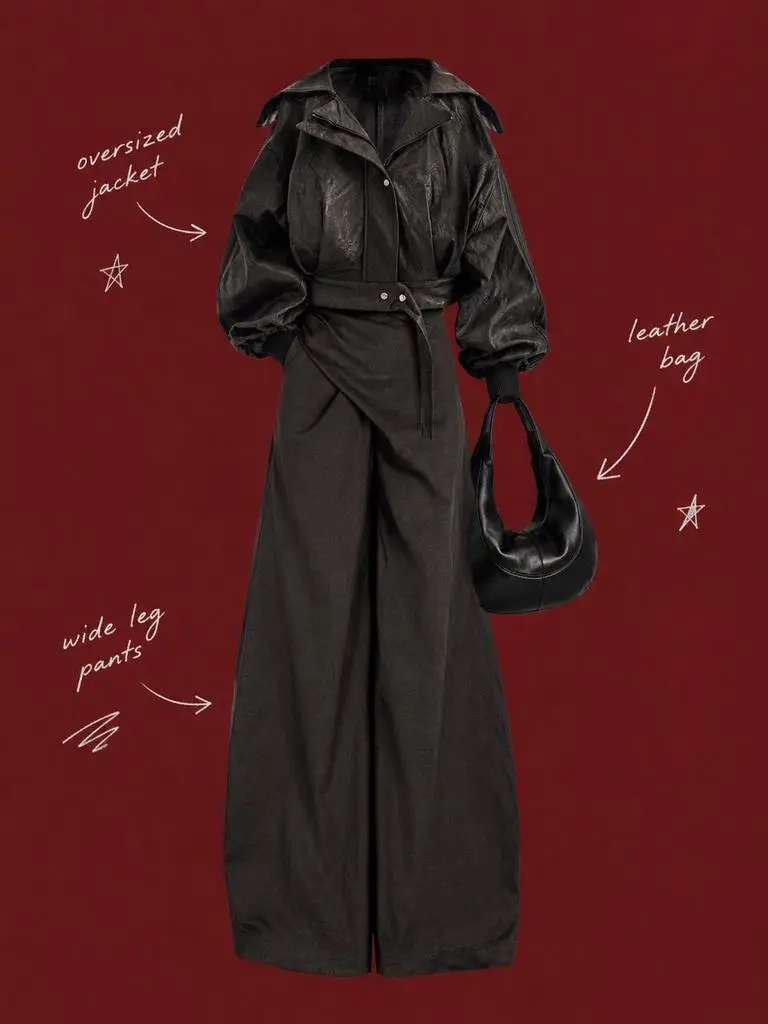
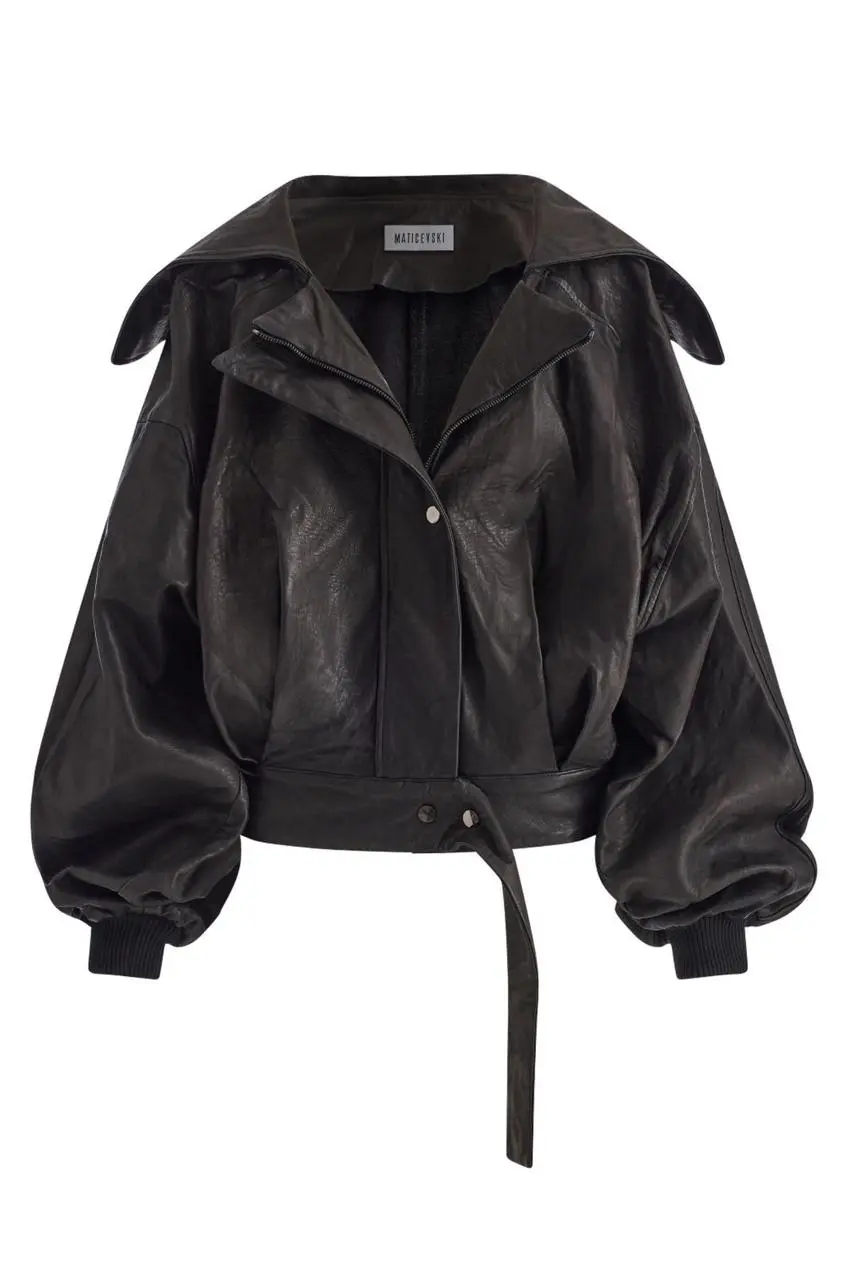
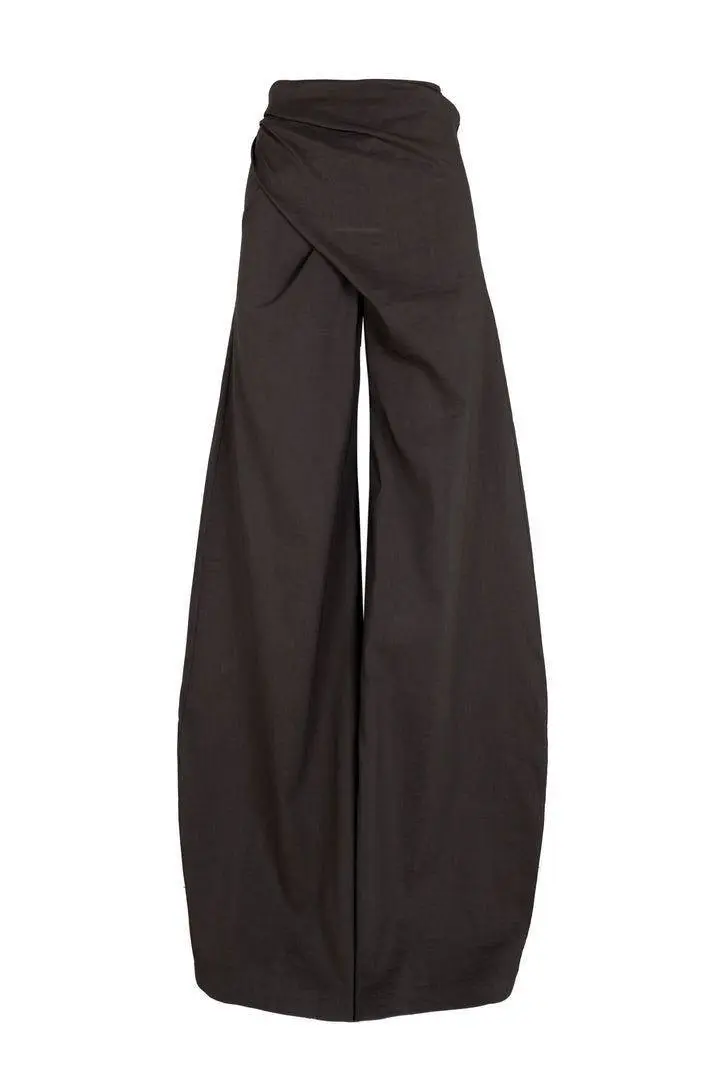
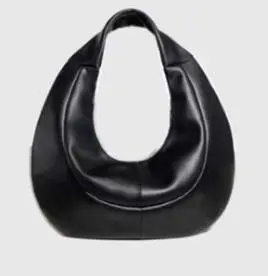
유지할 피사체와 주변 레이아웃을 별도 지시로 설명하세요. 이 예시의 문구는 “Use a solid deep burgundy, dark brick-red, or muted oxidized-red background that fills the entire canvas.”입니다. 의상 참조와 중앙 누끼 인물을 비교하고 주변에 드문드문 배치된 라벨을 확인하세요.

Use my uploaded image as the main person or product asset to create a vertical, vintage fashion collage poster. Carefully cut out the subject and place it in the center of the composition. Preserve its recognizable clothing, pose, silhouette, proportions, colors, and important details without changing its identity. Present the subject as a clean magazine-style cutout layered directly onto the background. If the uploaded image features a person, the head may be cropped out or extend beyond the top edge so the visual focus remains on the outfit and body shape. If the subject is a product, keep it complete, clear, and easily recognizable. Use a solid deep burgundy, dark brick-red, or muted oxidized-red background that fills the entire canvas. Do not add a white border, white margins, a paper frame, or empty white space around the poster. Add only a few white handwritten English words, curved arrows, and casual fashion-sketch doodles on the left and right sides of the subject. The arrows may point toward clothing pieces, accessories, or other important details. The writing should look naturally hand-drawn, slightly irregular, and loosely arranged, like annotations in a fashion designer’s sketchbook. Keep these elements sparse and make sure they do not cover the subject. The overall visual language should resemble an independent fashion magazine, a clothing-design scrapbook, or an experimental late-20th-century fashion advertisement. Keep the layout minimal and clear, with one central cutout subject against the red background. Use an approximately 2:3 vertical aspect ratio. The subject should occupy around 75%–85% of the poster’s height and be positioned centrally, slightly toward the bottom. Keep the final image sharp and clearly defined. Do not add torn-paper edges, rough cutout edges, glue marks, tape, folds, stains, fading, film grain, scanning noise, blur, distressed textures, decorative badges, realistic scenery, complex props, modern interface elements, neon lighting, 3D rendering, or overly vivid colors.
WeShop 결과: 조명으로 소재 설명

소재와 조명 명시하기

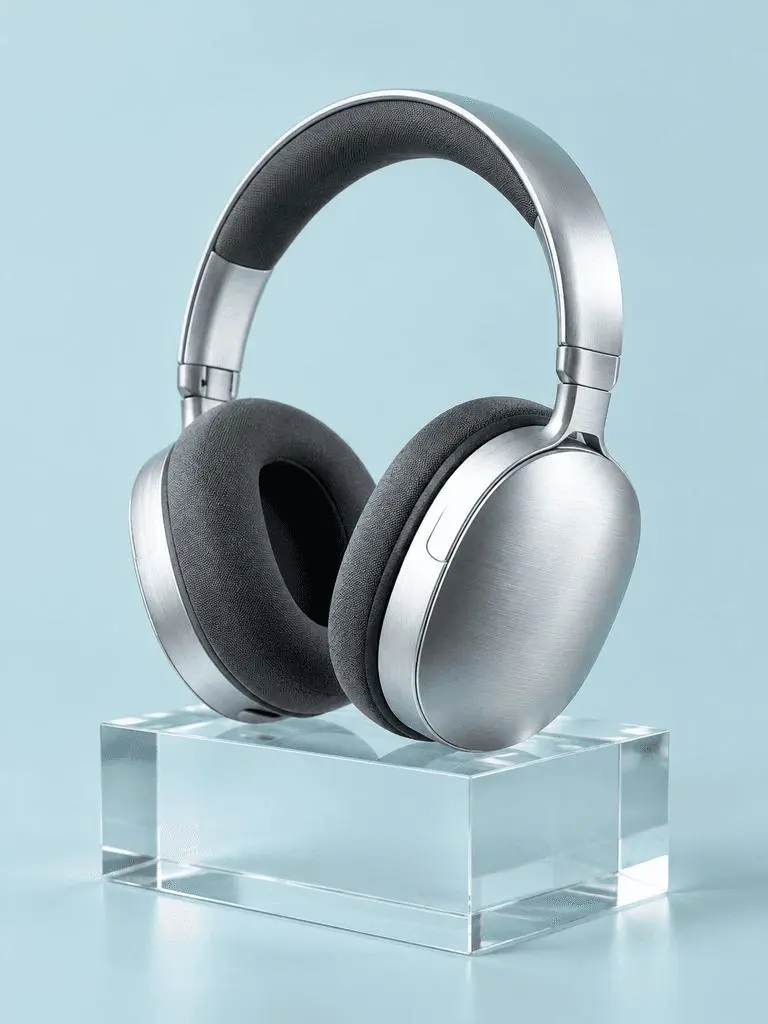
중요한 표면마다 눈에 보이는 조명 단서를 연결하세요. 이 예시의 문구는 “a broad softbox reflection across the metal”입니다. 브러시드 헤드폰, 패브릭 쿠션, 투명 블록과 각기 다른 빛 반응을 확인하세요.

A photorealistic commercial product photograph of one unbranded pair of brushed-silver wireless over-ear headphones. The headphones rest on a clear rectangular glass block against a seamless pale-cyan background. Show fine metal brushing, soft charcoal fabric ear cushions, a realistic transparent block, a clean contact shadow, and a broad softbox reflection across the metal. Use an eye-level three-quarter camera angle and a restrained monochrome palette. One pair of headphones only, no people, letters, logos, packaging, border, or watermark. Vertical 3:4 composition with the whole product visible.
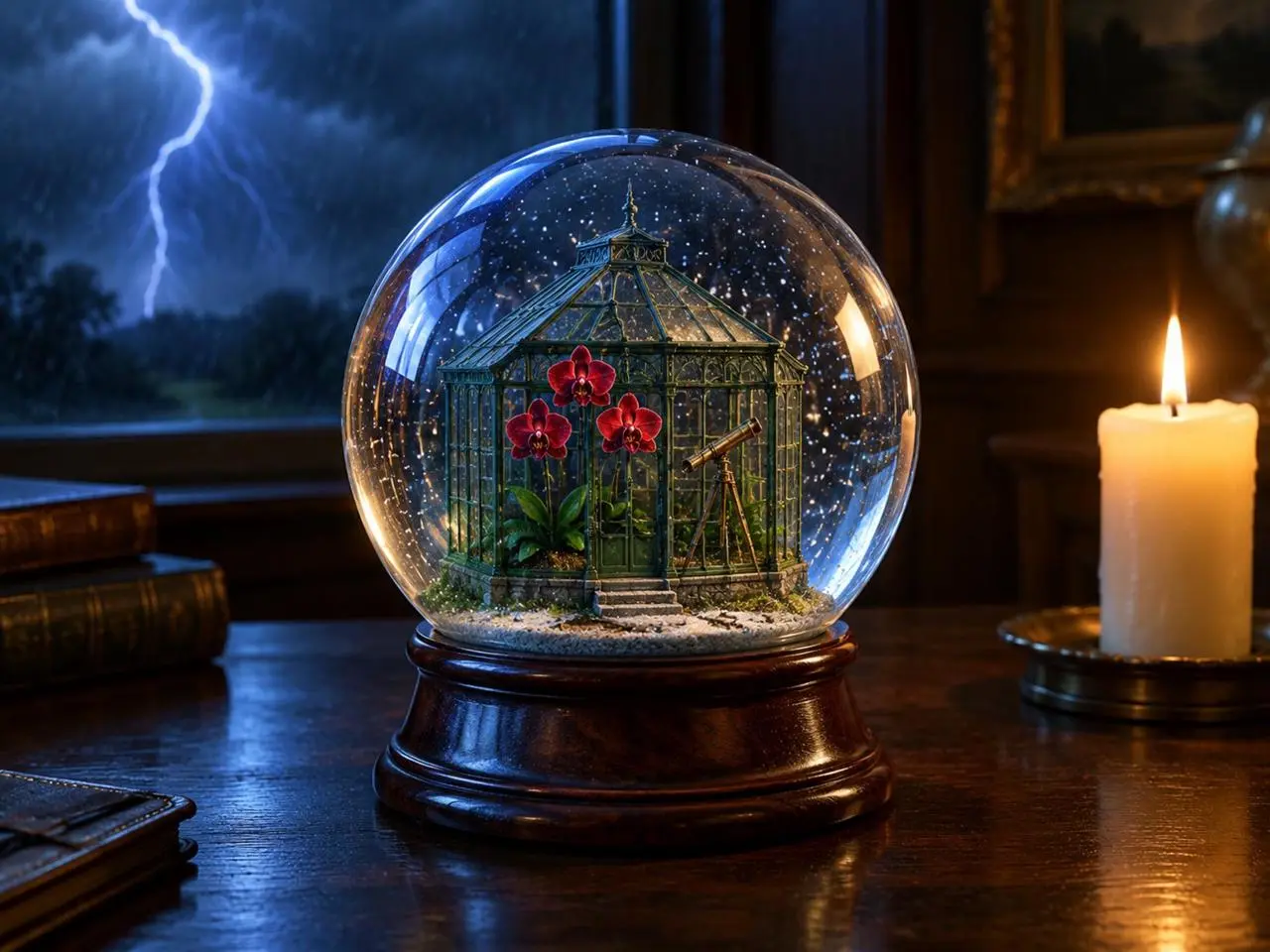
WeShop 결과: 전경, 배경, 빛 배치

광원 위치 지정하기

주요 사물, 배경 사건, 광원의 위치를 명확히 지정하세요. 이 예시의 문구는 “one lit ivory candle on the desk to the right of the globe”입니다. 앞의 지구본, 뒤의 번개, 옆의 따뜻한 촛불을 확인하세요.

Create a finished 3:4 photorealistic editorial image of exactly one clear glass snow globe resting on a dark walnut desk during a thunderstorm. Inside the globe is one miniature Victorian greenhouse containing exactly three red orchids and one small brass telescope. Place a sharp lightning bolt in the upper-left background and one lit ivory candle on the desk to the right of the globe. Use realistic glass reflections and refractions, cool blue storm light from the left, warm candlelight from the right, shallow depth of field, and detailed natural materials. Keep the entire globe visible. No people, no extra flowers, no extra globes, no text, no logo, no watermark.
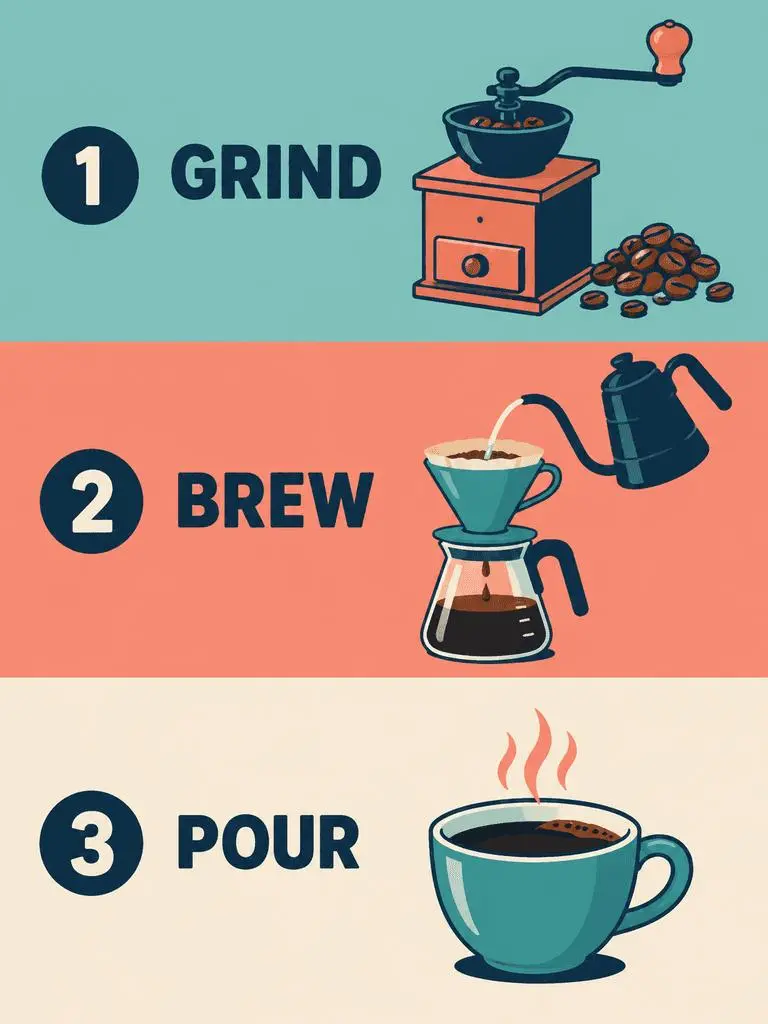
WeShop 결과: 패널 순서와 정확한 라벨 지정

패널 순서와 정확한 문구 지정하기

여러 패널 디자인에서는 패널 순서와 각 패널에 필요한 문구를 지정하세요. 이 예시의 문구는 “Panel 1 shows a simple hand grinder and coffee beans, with the exact heading 'GRIND'.”입니다. GRIND, BREW, POUR 라벨을 일러스트와 비교하고 위에서 아래로의 순서를 확인하세요.

Create a clean flat-vector educational infographic in a vertical 3:4 layout with exactly three equal horizontal panels stacked from top to bottom. Panel 1 shows a simple hand grinder and coffee beans, with the exact heading 'GRIND'. Panel 2 shows a pour-over cone over a glass server and a kettle pouring water, with the exact heading 'BREW'. Panel 3 shows a single ceramic cup filled with coffee, with the exact heading 'POUR'. Place the number 1, 2, or 3 beside each corresponding heading. Use teal, coral, cream, and dark-navy colors, consistent line weights, generous spacing, and a left-to-right illustration-and-label arrangement within every panel. Keep the three panels distinct and correctly ordered. No extra text, border, photorealistic imagery, or watermark.
사용 방법

WeShop AI에서 GPT Image 2 사용하기

GPT Image 2 선택 항목과 아래에 설명된 입력 경로로 시작하세요. 제출 전에 사용 가능한 설정과 포인트를 확인하세요.

이 모델에 필요한 입력 제공

GPT Image 2 선택을 유지하세요. 포스터는 원하는 문구와 레이아웃을 제공하고, 편집은 원본을 업로드해 역할을 지정한 뒤 완성할 이미지를 설명하세요.

이용 가능한 설정과 포인트 확인

크기 라벨: 1K, 2K, 4K. 품질: low, medium, high. 화면 비율: auto, 1:1, 1:2, 2:1, 1:3, 3:1, 2:3, 3:2, 4:3, 3:4, 16:9, 9:16, 21:9, 9:21. 이는 선택 가능한 설정이며 고정 픽셀 크기나 파일 형식 보장이 아닙니다. 실제 크기는 원본 결과 파일에서 확인하세요. 제출 전에 표시된 포인트와 요금제의 모델 접근 권한을 확인하세요.

결과 열기 및 확인

포스터 텍스트를 교정하고 패널 순서를 확인하세요. 참조 편집은 정확히 일치한다고 가정하지 말고 유지된 정체성, 사물 형태, 바뀐 영역을 원본과 비교하세요.

GPT IMAGE 모델 비교

GPT Image 2와 GPT Image 2.5 비교

GPT Image 2는 2.5 Flare 및 Sunburst와 별개입니다. Flare는 속도 중심 일상 생성, Sunburst는 까다로운 생성과 편집에 초점을 둡니다. 현재 GPT Image 2 폼에는 Low, Medium, High가 있으며 2.5 항목에는 XHigh와 Max도 표시됩니다. 공식 포지셔닝, 기록된 WeShop 설정, 현재 선택된 폼은 서로 구분되며 측정된 품질 또는 속도 순위를 뜻하지 않습니다.

비교 항목GPT Image 2GPT Image 2.5
모델 선택 항목GPT Image 2속도 중심 Flare, 까다로운 품질 요구의 Sunburst
생성과 편집텍스트 프롬프트와 이미지 기반 편집텍스트 프롬프트와 이미지 기반 편집
편집 초점생성·편집용 고충실도 이미지 입력OpenAI는 두 버전에서 정밀 편집과 피사체 보존이 개선되었다고 설명
WeShop 품질 단계Low, Medium, HighLow, Medium, High, XHigh, Max
WeShop 이미지 크기1K, 2K, 4K1K, 2K, 4K
WeShop의 4:5 및 5:4 형식현재 폼에 표시되지 않음Flare와 Sunburst 모두 제공
모델 선택 항목
GPT Image 2
GPT Image 2
GPT Image 2.5
속도 중심 Flare, 까다로운 품질 요구의 Sunburst
생성과 편집
GPT Image 2
텍스트 프롬프트와 이미지 기반 편집
GPT Image 2.5
텍스트 프롬프트와 이미지 기반 편집
편집 초점
GPT Image 2
생성·편집용 고충실도 이미지 입력
GPT Image 2.5
OpenAI는 두 버전에서 정밀 편집과 피사체 보존이 개선되었다고 설명
WeShop 품질 단계
GPT Image 2
Low, Medium, High
GPT Image 2.5
Low, Medium, High, XHigh, Max
WeShop 이미지 크기
GPT Image 2
1K, 2K, 4K
GPT Image 2.5
1K, 2K, 4K
WeShop의 4:5 및 5:4 형식
GPT Image 2
현재 폼에 표시되지 않음
GPT Image 2.5
Flare와 Sunburst 모두 제공

GPT Image 2를 유지할 때

결과가 지시에 맞으면 텍스트 중심 디자인, 구조화된 구도, 참조 편집에 GPT Image 2를 사용하세요. WeShop 폼은 Low, Medium, High 품질을 제공합니다.

GPT Image 2.5를 시도할 때

OpenAI의 포지셔닝에 따라 생성 속도가 우선이면 Flare, 품질 중심 지시에는 Sunburst를 고려하세요. 두 모델 모두 현재 WeShop 폼에서 XHigh와 Max 품질을 제공합니다. 기존 작업 방식을 바꾸기 전에 같은 대표 입력으로 평가하세요.

다른 이미지 모델

다른 이미지 모델 살펴보기

다른 모델 페이지에서 각 모델의 예시와 사용 가능한 작업 방식을 살펴보세요.

자주 묻는 질문

GPT Image 2 자주 묻는 질문

GPT Image 2 모델은 무엇인가요?

GPT Image 2는 OpenAI의 이미지 생성·편집 모델입니다. 텍스트와 이미지 입력으로 새 이미지를 만들거나 참조 기반 변경을 수행합니다.

GPT Image 2 활용 용도는 무엇인가요?

GPT Image 2를 텍스트 중심 디자인, 구조화된 구도, 참조 변환에 사용하세요. 재즈 포스터는 계획된 텍스트 위계를, 에디토리얼 보드와 네온 스타일 변경은 원본 이미지의 서로 다른 활용을 보여 줍니다.

GPT Image 2 사용에 어떤 입력이 필요한가요?

새 구도는 텍스트를 입력하고 참조 기반 편집은 이미지를 업로드하세요. 피사체, 환경, 레이아웃을 제공하는 입력을 설명하고 바꿀 부분을 지정하세요.

어떤 크기와 화면비 설정을 사용할 수 있나요?

크기 라벨: 1K, 2K, 4K. 품질: low, medium, high. 화면 비율: auto, 1:1, 1:2, 2:1, 1:3, 3:1, 2:3, 3:2, 4:3, 3:4, 16:9, 9:16, 21:9, 9:21. 이는 선택 가능한 설정이며 고정 픽셀 크기나 파일 형식 보장이 아닙니다. 실제 크기는 원본 결과 파일에서 확인하세요.

GPT Image 2 프롬프트는 어떻게 쓰면 되나요?

최종 장면을 설명하기 전에 각 이미지가 제공하는 요소를 명시하세요. 이 예시의 문구는 “Image 1 is the environment and botanical reference.”입니다. 사막 식물은 첫 참조와, 코트 형태는 두 번째 참조와 비교하세요. 가이드의 전체 프롬프트와 실제 입력을 읽은 뒤 자신의 작업에 맞게 조정하세요.

GPT Image 2 모델은 관련 모델과 어떻게 다른가요?

GPT Image 2는 2.5 Flare 및 Sunburst와 별개입니다. Flare는 속도 중심 일상 생성, Sunburst는 까다로운 생성과 편집에 초점을 둡니다. 현재 GPT Image 2 폼에는 Low, Medium, High가 있으며 2.5 항목에는 XHigh와 Max도 표시됩니다.

GPT Image 2 무료 이용이 가능한가요? 비용은 어떻게 정해지나요?

현재 WeShop 요금 페이지는 이 모델을 Free Trial에 포함하지 않습니다. 유료 요금제 접근 권한과 선택한 요청의 예상 포인트를 확인하세요. 이 페이지는 고정 요청 가격을 제시하거나 다른 제공사의 구독 할당량을 WeShop에 적용하지 않습니다.

어떤 한계를 확인해야 하나요?

필수 문구, 얼굴 디테일, 제품 형태와 편집 경계를 확인하세요. 세부 사항을 보존하라는 지시 자체가 결과에서 보존되었다는 증거는 아닙니다. 포스터 텍스트를 교정하고 패널 순서를 확인하세요. 참조 편집은 정확히 일치한다고 가정하지 말고 유지된 정체성, 사물 형태, 바뀐 영역을 원본과 비교하세요.

이 페이지의 예시에서 무엇을 배울 수 있나요?

저장된 GPT Image 2 예시는 네온 조각상 스타일 변환, 참조 이미지에서 에디토리얼 보드로, 타이포그래피 중심 재즈 포스터 사례를 보여 줍니다. 각 결과를 실제 프롬프트와 사용 가능한 입력과 함께 확인하세요. 사례는 하나의 요청을 보여 줄 뿐 결과 보장이나 성공률 벤치마크가 아닙니다.